
LittleJohnny AI
AI that keeps educational videos and blocks distractions.
18 followers
AI that keeps educational videos and blocks distractions.
18 followers
LittleJohnny is an AI productivity and focus companion designed to help you protect your attention and follow through on what matters. Plan tasks, run timed focus sessions, block distracting websites, and review your progress from a unified Command Center. Its standout feature is intelligent YouTube filtering: instead of blocking the entire platform, LittleJohnny evaluates individual videos and filters distractions based on your chosen strictness. Available on Chrome and Firefox.




Hey everyone,
This has been a long time coming, but @littlejohnny_ai is finally live. (More on the name later)
To start of I think YouTube is one of the greatest tools we have today. It contains everything from university lectures and technical walkthroughs to some of the most distracting content imaginable.
My original reason for building LittleJohnny was simple: I kept getting distracted.
I would open YouTube with a specific task—learning the OSI model, for example—and find an excellent video explaining it. Then I would notice an interesting recommendation and tell myself, “Just one video.”
A few recommendations and some Shorts later, two hours had passed, while the task I originally wanted to complete remained untouched.
But there was also a second reason for building LittleJohnny—and I think this reason may be even stronger than the first.
I began noticing that I rarely allowed myself to be bored anymore. Every quiet moment could immediately be filled with another video, another Short, another notification or another scroll.
We live in a time where we are exposed to dopamine-inducing content almost constantly. This level of stimulation is not normal in the context of human history. The more we consume it, the more our brains seem to crave it.
But why are human beings supposed to experience boredom in the first place?
I believe boredom has a purpose. It pushes us to think, create, explore and seek new and meaningful challenges. It is pretty ironic how we are becoming chained by the very technologies we once thought would free us.
That was the problem I wanted LittleJohnny to address.
So, what exactly is LittleJohnny?
Most productivity tools seem to take one of two approaches: they either try to block your distractions or help you organize and improve your productivity.
LittleJohnny is being built to tackle both. (still working on the latter)
It is a focus and productivity system consisting of a browser extension and a companion web dashboard.
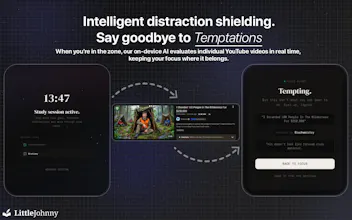
Its defining feature is that it does not force you to block YouTube completely. During a YouTube Focus session, an AI focus engine evaluates individual videos according to your chosen strictness. Educational videos—or, in Strict mode, videos directly related to your goal—remain available, while distracting videos are blocked.
Outside YouTube, you can run normal focus sessions, organize the tasks you want to complete and block distracting websites using your personal blocklist.
Your focus activity is connected to the companion dashboard, where the Command Center brings together your tasks, completed sessions, session receipts and the time you have saved. The current product establishes the foundation for both sides, while upcoming features will continue expanding the planning and productivity side of LittleJohnny.
LittleJohnny gives you two different ways to focus:
Normal Focus
Run a timed focus session, organize the tasks you want to complete, and block every website on your personal blocklist while you work.
Normal Focus works whether you use YouTube or not. You can use LittleJohnny as a traditional focus tool without enabling any of its YouTube features.
YouTube Focus
This is where much of the hard work behind LittleJohnny went.
It does not simply rely on a list of blocked words, channels or video categories. When you try to watch a video during a focus session, the AI evaluates the information and context available around that particular video according to the strictness level you selected.
It then decides whether the video should remain available or be blocked.
You can choose from three levels:
Low: Allows broadly educational content such as documentaries, news, pop science and other generally informative videos while blocking obvious distractions.
Medium: Prioritizes more structured learning, such as lectures, coding walkthroughs, courses and problem-solving content.
Strict: Uses the subject and topic you entered when starting the session. A video must directly support that specific focus goal.
For example, if your goal is to learn the OSI model, Strict mode will not allow a video simply because it is generally educational. The video must be relevant to the particular subject you said you wanted to study.
Low and Medium evaluate a video’s general educational value. Only Strict evaluates it against your chosen subject and topic.
Most evaluations begin on your device. When the decision is uncertain, the video’s context may be checked again by LittleJohnny’s cloud AI before a final decision is made.
What about TikTok, Instagram and other platforms?
LittleJohnny currently treats those platforms differently.
YouTube is somewhere many of us intentionally go for lectures, tutorials and research. On short-form platforms, the useful content is less predictable because continuous scrolling and an ever-changing algorithm are central to the experience.
That does not mean those platforms contain nothing useful. However, for the way LittleJohnny currently works, they are better handled through the normal blocklist. You can therefore block platforms such as TikTok and Instagram completely during a focus session.
LittleJohnny is currently available for Chrome and Firefox, together with its companion web dashboard and Command Center.
P.S: while developing LittleJohnny, several people told me, “I would use this if it worked on my phone.” (understandable since many people do get their phones out while they are working)
I have heard that feedback, and I am currently developing a solution for mobile devices as well. I do not want to promise a release date before it is ready, but it is something I am actively working on, and why is it named LittleJohnny, I kind of wish i had a good answer for that, but I have no idea.. ^_^, apologies for the long comment but it felt necessary to explain the reason behind this
Thank you for taking the time to read this..
Website: little-johnny.io