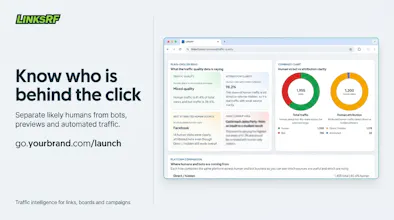
Create branded campaign links like go.yourbrand.com/offer and understand who actually visited. LinksRF separates likely humans from bots, social previews, automated traffic, and raw requests. Build short links, boards, bio pages, and funnels; manage custom domains and teams; and review campaign analytics from one workspace. Start free, no card required.
No reviews yetBe the first to leave a review for LinksRF
Maker
📌
Hey Product Hunt 👋
I'm Abhishek, the maker of LinksRF, built in Noida, India.
The idea began with a simple question:
When I share a link, who or what is actually opening it?
I wanted to know whether someone genuinely visited, where the traffic came from, which type of device was used and whether visitors returned.
But I quickly discovered that an "open" doesn't always mean a person clicked.
Messaging apps may fetch links to generate previews. Search crawlers, security scanners and other automated tools can request them too. When all this activity is presented as one click count, it becomes difficult to understand what actually happened.
That's why I started building LinksRF, not just to shorten links, but to make the traffic behind them easier to understand.
With LinksRF, you can:
🔗 Create short, readable campaign links
🌐 Use branded domains such as go.yourbrand.com/offer
🧠 Distinguish likely human activity from social previews, bots and automation
📊 Explore sources, device families, approximate locations and traffic-quality evidence
📚 Build shareable boards and resource hubs
👤 Publish bio pages and focused funnels
👥 Collaborate with team members on supported plans
LinksRF is not designed to reveal a visitor's personal identity, and it doesn't claim that every request can be classified with perfect certainty. It uses available request and browser-engagement signals to estimate whether activity was likely human, automated, suspicious or simply a platform generating a preview.
The goal is simple: when you share a link, you should receive more useful context than one unexplained click count.
This is the first public launch of LinksRF, and I'd genuinely value your feedback:
1. Is the difference between raw requests and likely human activity clear?
2. Which insights matter most when you share a link?
3. What would LinksRF need before you considered switching from your current link tool?
You can start free, no card required.
Thank you for checking out LinksRF. I'll be here throughout the launch to answer questions and learn from your feedback. 🙏
Report
honestly the bot filtering is what caught my eye, but it would be super useful if you could export those analytics as a csv or push them to google sheets. right now i can see the split in the dashboard, but i need to combine it with my own ad spend data to figure out what is actually working. a simple zapier hook or a scheduled email report would save me a ton of manual copy pasting.
Report
Maker
@perry_tucker Thanks! We actually already support exporting the traffic analytics as CSV. 🙂
I completely agree on the automation side though. Being able to push reports to Google Sheets or connect through Zapier/webhooks would make it much easier to combine LinksRF data with ad spend and other marketing data without manual exports.
Really appreciate the suggestion!
Report
Congrats on the launch, Abhishek. The thing I like most is how honest the framing is — "likely human" instead of promising perfect certainty. Most link tools would have oversold that. On the content side we hit the same mess in analytics: preview fetches and bots inflate the numbers and you can't really tell what landed. Curious how you handle a messaging app that fetches the same link a few times for a preview — does that get filtered, or counted as separate opens?
Thanks, Saied! Really appreciate that, that was a deliberate choice. We don't think traffic quality is binary, so we'd rather communicate uncertainty than overstate confidence.
For messaging apps specifically, preview fetches are treated differently from genuine visits whenever we can distinguish them. We look at a combination of request patterns, headers, interaction signals and subsequent telemetry rather than simply counting every HTTP request as an open.
For example, if WhatsApp or another messaging platform fetches the same link multiple times to generate previews, those requests are evaluated as preview traffic and kept separate from likely human visits where there's evidence of an actual browser session and user interaction.
It's not perfect, every platform behaves a little differently but the goal is to give users a much more truthful picture than a raw click count. That's exactly why we expose the underlying evidence instead of treating the classification as a black box.
Thanks for the great question!
Report
finally a link shortener that actually filters out the bot noise from analytics, that alone is worth the switch
Report
Maker
@bella_dunlop Thanks! That’s exactly the problem I wanted to solve. Raw click counts can look impressive while previews and automated traffic quietly inflate them, so LinksRF tries to make that difference visible instead of hiding everything inside one number. Really appreciate you checking it out!
Such a promising launch—congrats on LinksRF! Branded links that separate humans from bots and previews is a clever idea. Wishing you a strong Product Hunt day! 🚀


honestly the bot filtering is what caught my eye, but it would be super useful if you could export those analytics as a csv or push them to google sheets. right now i can see the split in the dashboard, but i need to combine it with my own ad spend data to figure out what is actually working. a simple zapier hook or a scheduled email report would save me a ton of manual copy pasting.
Congrats on the launch, Abhishek. The thing I like most is how honest the framing is — "likely human" instead of promising perfect certainty. Most link tools would have oversold that. On the content side we hit the same mess in analytics: preview fetches and bots inflate the numbers and you can't really tell what landed. Curious how you handle a messaging app that fetches the same link a few times for a preview — does that get filtered, or counted as separate opens?
@saied_alimoradi
Thanks, Saied! Really appreciate that, that was a deliberate choice. We don't think traffic quality is binary, so we'd rather communicate uncertainty than overstate confidence. For messaging apps specifically, preview fetches are treated differently from genuine visits whenever we can distinguish them. We look at a combination of request patterns, headers, interaction signals and subsequent telemetry rather than simply counting every HTTP request as an open. For example, if WhatsApp or another messaging platform fetches the same link multiple times to generate previews, those requests are evaluated as preview traffic and kept separate from likely human visits where there's evidence of an actual browser session and user interaction. It's not perfect, every platform behaves a little differently but the goal is to give users a much more truthful picture than a raw click count. That's exactly why we expose the underlying evidence instead of treating the classification as a black box. Thanks for the great question!
finally a link shortener that actually filters out the bot noise from analytics, that alone is worth the switch
@bella_dunlop Thanks! That’s exactly the problem I wanted to solve. Raw click counts can look impressive while previews and automated traffic quietly inflate them, so LinksRF tries to make that difference visible instead of hiding everything inside one number. Really appreciate you checking it out!
Pazi
Such a promising launch—congrats on LinksRF! Branded links that separate humans from bots and previews is a clever idea. Wishing you a strong Product Hunt day! 🚀