Launching today

lazychat
One terminal for all your AI coding agents
3 followers
One terminal for all your AI coding agents
3 followers
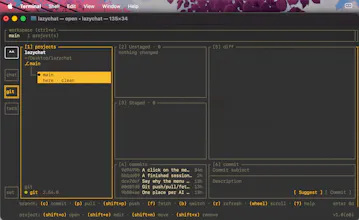
Too many AI coding agents means too many terminal tabs and missed questions. lazychat puts them in one keyboard-driven TUI, like lazygit. - Claude Code and Codex side by side, grouped by project - See who works, who waits for you, and draft the next prompt meanwhile - Built-in Git: diffs, commits, worktrees, AI commit messages - A shell in every project - Lazy, the mascot, flags the agent that needs you and notifies you when away Free and open source. macOS today, more agents to come.




Hey Product Hunt 👋
I build with AI coding agents all day, usually several at once: one refactoring, one writing tests, one exploring a bug. My screen turned into a wall of terminal tabs, and I kept missing the moment an agent stopped to ask me something. It would just sit there waiting while I was in another tab.
So I built lazychat: one terminal UI where every agent session lives under its project, with Git and a shell one key away. Think lazygit, but for AI coding agents.
A few things I'm happy with:
🐣 Lazy, the mascot. It sits on the side rail and watches every session. It types while an agent works, holds up a "?" when one needs you, and celebrates when one is done. Click it to jump straight to that session. If you're in another window, you get a desktop notification, and Lazy also lives in your menu bar.
✍️ Never wait on an agent. Draft your next prompt while the agent is still busy, resume old sessions, and see per-prompt details: tokens used, which agents, skills and MCP calls it touched.
🌿 Git without leaving. Each project gets a Git tab: changes as a folder tree, diffs you can walk line by line, commits and worktrees, plus a "Suggest" button that has the agent write your commit message from what you staged.
It started as "just a list of sessions" and grew one itch at a time. Every feature is something I needed that week. Today it supports Claude Code and Codex, and the agent layer is built so more can plug in.
🚀 Try it (free and open source, macOS):
git clone https://github.com/perpeer/lazychat
cd lazychat && ./install.sh
Then run lazychat. `lazychat doctor` tells you which agents are ready.
🙏 This is a solo project, and your support means a lot:
⭐ Star it on GitHub. At 225 stars it can go into Homebrew, so `brew install lazychat` is a few stars away: https://github.com/perpeer/lazychat
💛 If it saves you time, you can sponsor Lazy: https://github.com/sponsors/Perpeer
💬 Which agent should I add next? What's the most annoying part of juggling agents for you?
🐛 Found a bug or have an idea? Open an issue, I read every one.
Thanks for checking it out!