KonxiOS is your AI operating system and personal assistant running 24/7 that automates tasks, writes code, manages workflows, create UGC videos, TTS, STT and enhances productivity with intelligent assistance built in all using local first models with optional cloud models support
Hey Product Hunt 👋
I’m excited to finally share Konxios.
I’ve been building this because I felt like current AI tools were missing something important.
We have amazing models now, but they mostly live inside chat boxes.
I wanted an AI that could actually work:
What you get:
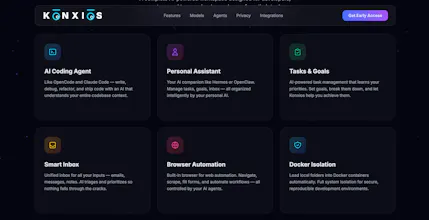
🤖 AI Agent Workspace
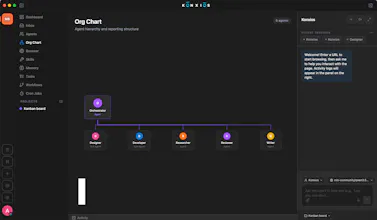
Create agents and sub-agents with specialized skills, like having your own AI team.
🧠 Persistent Memory
Your AI remembers context across conversations and sessions.
⚡ 30+ Built-in Tools
Web search, file management, notes, system actions, and more.
🎯 Goal-Based Execution
Describe what you want and Konxios breaks it into actionable tasks.
📋 Kanban Task Management
Track your AI-assisted projects from idea to completion.
🔄 Workflow Automation
Build multi-step automations inspired by tools like n8n.
💻 Coding Agent
A built-in coding workspace with file explorer, editor, and change previews.
🌎 Browser Automation (Built-In browser)
Let your agents interact with websites through an integrated browser.
🔒 Privacy First
Run local projects inside isolated Docker containers for safer AI execution.
🎙 Local Voice Mode
Talk naturally with local speech-to-text and text-to-speech.
So I built Konxios.
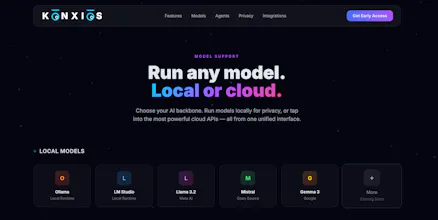
It’s a local-first AI operating system built around Ollama and LM Studio, with agents, workflows, memory, tools, browser automation, and a coding environment.
Everything runs locally by default, but you can connect cloud models when you need them.
I’d love feedback from the Product Hunt community:
What would you want your personal AI operating system to do next?
Thanks for checking it out ❤️
Report
Curious how the local-first models actually hold up for something like coding or long workflows, do they run on a regular laptop or do you need a beefy setup to get good results?
@enes1079327 Well you would need at least 24GB of ram to run some good models even though 16GB will work as well but that might be a bit slow.
Report
the docker isolation for local projects makes sense, but does the browser automation agent run inside that same sandboxed container, or does it need host-level access to actually control a real browser? that combo (autonomous agent + it can click around the web on your behalf) feels like the part that most needs the isolation, more so than the coding workspace itself.
@galdayan yes we are using in-app browser so we don't use the host's browser directly thus the agent only has access to the website's that you login using the in-app browser which isolates the agent from accessing the host's browser directly. We have deliberately not enabled the clicking outside of the Konxios app as that would affect the privacy so no outside pointer allowed.
Report
@nabeel_khan That's a sensible tradeoff. One follow-up: if I want to let it click outside deliberately, like actually paying a bill on a real banking site, is that a hard no by design, or is there a power-user escape hatch (even a scarier one hidden behind a warning) for cases where the walled garden is too limiting?
@galdayan we simply did not provide the capability to drive the mouse outside of the app in the first place for privacy reasons so even if we told the assistant to do so it won't be able to do that, that is by design because i wanted to feel comfortable installing this on my primary mac to be honest i am never comfortable installing codex or claude because their apps have direct access to the mouse pointers and they don't run inside a docker so i would never be comfortable them running on my primary system ever. This was the primary reason of developing Konxios, its a privacy first AI operating system so even if the underlying agent for some reason goes rouge it won't be able to harm our host system even if it wanted to. Plus we have granular control on the permissions given to an agent like you can specifically give permission to use terminal inside the docker container or not and simply just stick to read / write, browser automation and a lot more granular permissions can be given to a certain agent. I hope this clarifies.
Report
@nabeel_khan that's a genuinely reassuring answer, not enforcing it at all beats a permission toggle the agent could argue its way around. does the terminal-inside-docker permission get enforced the same hard way, or is that one more of a soft setting since terminal access inside an already-isolated container is lower stakes than clicking outside the box?
Report
Tried Konxios for a bit and the local-first setup actually feels snappy on my laptop, which I was not expecting. Having code help and UGC tools in one place without bouncing between apps is genuinely useful.
Report
Building with this feels smooth and the local execution gives me peace of mind on data privacy. Big fan.
NoteUX Chrome Extension
Curious how the local-first models actually hold up for something like coding or long workflows, do they run on a regular laptop or do you need a beefy setup to get good results?
NoteUX Chrome Extension
@enes1079327 Well you would need at least 24GB of ram to run some good models even though 16GB will work as well but that might be a bit slow.
the docker isolation for local projects makes sense, but does the browser automation agent run inside that same sandboxed container, or does it need host-level access to actually control a real browser? that combo (autonomous agent + it can click around the web on your behalf) feels like the part that most needs the isolation, more so than the coding workspace itself.
NoteUX Chrome Extension
@galdayan yes we are using in-app browser so we don't use the host's browser directly thus the agent only has access to the website's that you login using the in-app browser which isolates the agent from accessing the host's browser directly. We have deliberately not enabled the clicking outside of the Konxios app as that would affect the privacy so no outside pointer allowed.
@nabeel_khan That's a sensible tradeoff. One follow-up: if I want to let it click outside deliberately, like actually paying a bill on a real banking site, is that a hard no by design, or is there a power-user escape hatch (even a scarier one hidden behind a warning) for cases where the walled garden is too limiting?
NoteUX Chrome Extension
@galdayan we simply did not provide the capability to drive the mouse outside of the app in the first place for privacy reasons so even if we told the assistant to do so it won't be able to do that, that is by design because i wanted to feel comfortable installing this on my primary mac to be honest i am never comfortable installing codex or claude because their apps have direct access to the mouse pointers and they don't run inside a docker so i would never be comfortable them running on my primary system ever. This was the primary reason of developing Konxios, its a privacy first AI operating system so even if the underlying agent for some reason goes rouge it won't be able to harm our host system even if it wanted to. Plus we have granular control on the permissions given to an agent like you can specifically give permission to use terminal inside the docker container or not and simply just stick to read / write, browser automation and a lot more granular permissions can be given to a certain agent. I hope this clarifies.
@nabeel_khan that's a genuinely reassuring answer, not enforcing it at all beats a permission toggle the agent could argue its way around. does the terminal-inside-docker permission get enforced the same hard way, or is that one more of a soft setting since terminal access inside an already-isolated container is lower stakes than clicking outside the box?
Tried Konxios for a bit and the local-first setup actually feels snappy on my laptop, which I was not expecting. Having code help and UGC tools in one place without bouncing between apps is genuinely useful.
Building with this feels smooth and the local execution gives me peace of mind on data privacy. Big fan.
NoteUX Chrome Extension
@muhammad_saad66 Thank you 🙏 Privacy was the very first reason i started off on this project.
The workspace feels interactive and responsive which is exactly what media design work needs. Love the flow.
NoteUX Chrome Extension
@fahad_baig3 Thank you Fahad, this is just the start, i am improving this daily now.
Browser automation with AI agents is going to speed up my campaign workflows a lot. Big fan already.
NoteUX Chrome Extension
@muhammad_raheel_khan Thanks, yup browser automation is built-in and we have lots of exciting things in the pipeline