Konjac turns every camera capture into an OCR note with translation, then keeps you in the same workspace for the next one. Use Apple on-device processing or your own OpenAI, Claude, or Gemini key. Built for books, subtitles, and language learning.
Framer AI AgentsDesign and publish professional sites with AI
Promoted
Maker
📌
Hi Product Hunt,
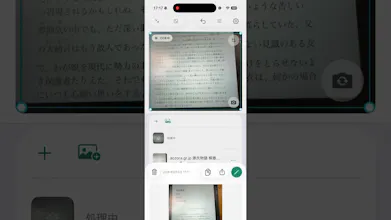
I built Konjac for the moments when I want to capture several passages without breaking my reading or viewing flow. Most scanner workflows make each capture feel like a separate task. Konjac keeps the camera, OCR results, translations, and saved notes together in one continuous workspace.
Press the shutter and a new OCR note appears. If translation is enabled, the original and translation stay together. Then the camera is ready for the next passage. This is especially useful for foreign-language books and video subtitles.
Konjac can use Apple on-device OCR and translation where available. People who prefer another provider can configure their own OpenAI, Claude, or Gemini API key, which is stored in the device Keychain. Notes stay on the device and can sync through the user's private iCloud database. The standard App Store version is free and includes consent-gated native ads.
Konjac is available for iPhone and iPad in English, Japanese, and Simplified Chinese. I would especially value feedback on the continuous capture workflow and how well it supports language learning. Please tell me what you capture first.