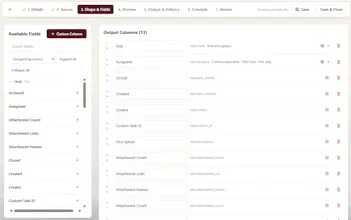
Kodavara DataFlow transforms ClickUp data into customized, ready-to-use exports. Select and rename fields, join related datasets, create calculated values, standardize formatting, and automate recurring delivery—without maintaining code or paying for a custom integration.
Hey Product Hunt! I’m the founder of Kodavara and the person behind DataFlow.
I built DataFlow after spending years helping organizations implement and optimize ClickUp. One problem kept coming up: companies store an enormous amount of valuable operational data in ClickUp, but getting it back out in a clean, connected, and usable format is much harder than it should be.
A basic CSV export rarely solves the actual business need. Teams still have to find the right fields, combine separate datasets, rename columns, calculate values, reformat dates and time, remove unnecessary data, and rebuild the same output again next week.
The alternatives are usually repetitive manual cleanup, fragile chains of automations, expensive custom integrations, or using AI to perform work that should be consistent and deterministic.
One of the ideas behind DataFlow—and the other Kodavara tools we’re building—is simple: save your AI credits, tokens, and usage for agents, decision support, analysis, and the other things AI is genuinely good at. Exporting data, assigning the next project number, or generating a correctly formatted invoice shouldn’t require an AI model every time.
Here are two examples of how DataFlow can be used:
1. Time-tracking and billing exports
Pull time entries from ClickUp, join them with users, teams, tasks, projects, clients, and custom fields, then convert tracked time into the exact decimal or duration format your finance system requires. Rename columns, calculate billable totals, apply rounding rules, and generate the same clean output every billing period.
2. Cross-Space and cross-feature reporting
Combine data across multiple ClickUp Spaces, Lists, tasks, custom fields, time entries, users, goals, or other connected features. Instead of downloading separate files and rebuilding lookups manually, DataFlow creates one reusable dataset with your mappings, formulas, formatting, and output structure already applied.
With DataFlow, you can:
• Select, map, and rename the ClickUp fields you need
• Join related datasets across Spaces and ClickUp features
• Add formulas and concatenated values
• Standardize dates, durations, decimals, and other formats
• Create reusable export configurations
• Run exports manually or automate recurring delivery
• Update the configuration yourself whenever requirements change
DataFlow is the first standalone release in a larger family of practical Kodavara tools. We’re also working on administrative tools, workspace and automation audit reports, a Sequencer for controlled project numbers, IDs, WBS codes, and finite code registries, and Structured Outputs for generating invoices, receipts, certificates, and other consistent documents without consuming AI tokens.
These tools are being built for ClickUp consultants, operations teams, finance teams, administrators, project-based businesses, and anyone who has outgrown basic exports but doesn’t want to commission and maintain custom code.
I’d genuinely appreciate your feedback—especially what you currently export from ClickUp, what cleanup you still perform manually, and what datasets, formats, or destinations you would like us to support next.