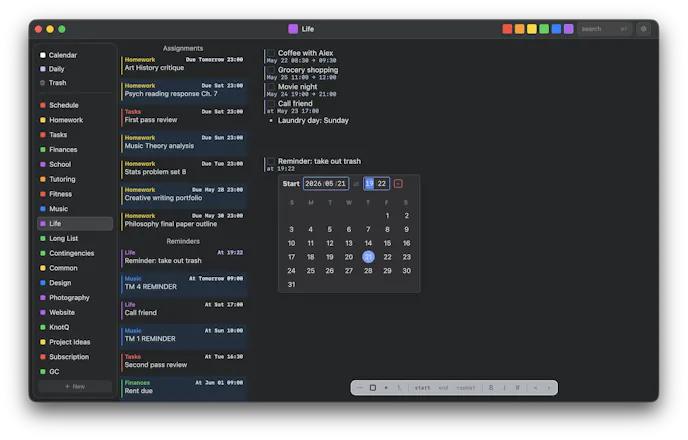
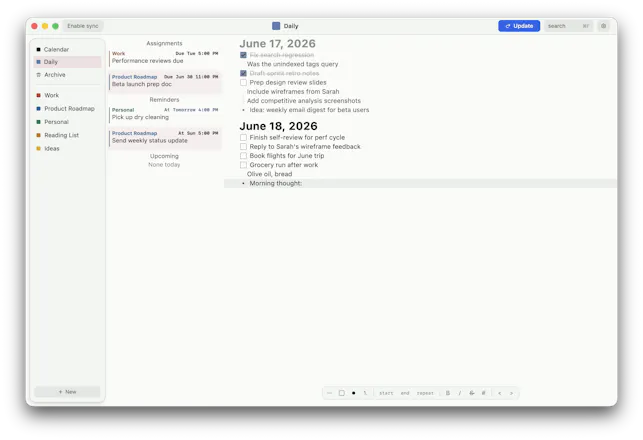
KnotQ turns plain-text plans into a live calendar. Add a start, deadline, or both to any line and it becomes a reminder, assignment, or event. Keep projects, tasks, and schedules together in local-first files that work offline—then use the Daily Queue to carry unfinished work forward. Free on iOS, Android, macOS, Windows, and Linux; optional sync keeps devices aligned.
Wispr Flow: Dictation That Works EverywhereStop typing. Start speaking. 4x faster.
Promoted
Maker
📌
Hey Product Hunt! I built KnotQ because planning kept getting fragmented: notes in one app, tasks in another, and calendars somewhere else. I wanted a workspace where I could write a plan naturally and make any line schedulable without translating it into a separate system.
KnotQ is built around “schemes”: structured, plain-file documents with headings, checkboxes, and nested items. Add a start date, due date, or both to a line and it becomes a reminder, assignment, or calendar event. The Daily Queue provides one focused list for today and carries unfinished work forward.
It’s local-first, works offline with no account, and is free on iOS, Android, macOS, Windows, and Linux. Optional sync is there for people who want it, but it’s never required.
I’d love to hear: What’s the hardest part of keeping your plans, tasks, and calendar in sync?