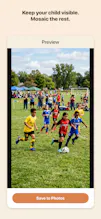
Sharing videos of your child's birthday, sports game, or school event? Other kids appear in the frame. KidsMask solves this in one tap. Auto-detects faces, keeps YOUR child visible, mosaics the rest. Manual editing catches auto misses. 100% on-device β no cloud, no data collection. One-time $4.99 for Pro.
No reviews yetBe the first to leave a review for KidsMask
Maker
π
Hey Product Hunt! π
I'm Kou, an indie iOS developer from Japan (kouworks). This is my second launch this month.
Last week I shipped VlogMask β a face mosaic app for solo vloggers filming their own content. Niche audience, and honestly it didn't get much traction here. Learned a lot.
Today I'm launching KidsMask. Same core tech, different audience β this one is for parents.
**Why this problem matters**
If you have kids, you know this: you record their birthday party or sports game, but you can't share the video anywhere. Other kids appear in the frame. Getting permission from every parent isn't practical.
Existing solutions either send your videos to cloud servers (which felt wrong to me β you're creating a database of children's faces on someone else's computer, just to blur them), require complex editing skills, or don't detect profile faces well.
**What KidsMask does**
β Tap YOUR child's face β they stay visible
β Everyone else β automatic mosaic
β Manual editing when auto misses someone (side profiles, kids in hats, distant faces)
β 100% on-device β nothing leaves your iPhone
β One-time $4.99 for Pro, no subscription
**Tech under the hood**
Building this was a rabbit hole. Some lessons learned:
- Apple's Vision framework misses profile faces critically. Had to swap in YuNet CoreML for better detection.
- Position-based tracking in video breaks when the camera pans (the world stays still, camera moves). Ended up writing a custom color-histogram tracker that handles pans and brief occlusions.
- Face re-identification when a child leaves/re-enters the frame needed dlib (public domain model).
- `AVAssetWriter.expectsMediaDataInRealTime = true` is required even for offline batch writing. False causes the hardware encoder to deadlock. That one took days to figure out.
30+ real device tests to get the video tracking right.
**Free vs Pro**
Free tier: 1-min videos, 3 photos/day, pixel mosaic
Pro ($4.99, one-time): unlimited processing, blur + emoji stickers, batch processing, no watermark
Zero data collection. No cloud APIs. No analytics. No ads. App Store's privacy label literally says "no data collected."
Would love feedback β especially from parents in the community. Happy to answer technical questions too.
β Kou
Report
The face detection caught my kid's teammates in the background way better than I expected. Manual touch-ups are still needed for profile shots, but it beats editing every clip one by one.
Report
Maker
@jeffrey_evanΒ This is exactly the workflow I hoped people would land on β auto
handles the bulk, manual catches the stragglers.
Profile shots are genuinely the hard case. I swapped Apple's Vision
framework for YuNet specifically because Vision was missing angled
faces almost entirely, and YuNet got it to maybe 70%. Still not
enough to trust blindly, which is why the manual editor exists at
all β it's not a fallback, it's part of the design.
Curious what kind of clips you're running through it. Sports games
seem to be the toughest: kids moving fast, lots of profile angles,
and half the frame is other people's children.
Thanks for actually trying it out and reporting back π
Report
Maker
Just launched KidsMask on Product Hunt. It's a face mosaic app specifically designed for parents who want to share their kid's videos without exposing other children's faces. The problem Sharing your kid's birthday party or sports day video? Other kids appear in the frame. Getting permission from every parent is impractical. Core features - Auto face detection + tap to protect your child (keeps them visible) - 3 mosaic styles: Pixel, Blur, Emoji stickers - Manual editing mode for auto-detection misses (crucial for profile faces, kids wearing hats, distant faces) - 100% on-device (YuNet CoreML for detection + custom color-based tracker for video) - Video support up to 4K - Free tier: 1-min videos, 3 photos/day, pixel mosaic - Pro: $4.99 one-time, no subscription Tech notes This is my second iOS app in a series. First was VlogMask (for vloggers). Learned a lot from that launch, which is why KidsMask has: - Better face detection (added YuNet after Vision framework kept missing profile faces) - Color-histogram tracking (position-based tracking fails when camera pans) - Manual edit mode (auto detection isn't perfect β needed a safety net)
The face detection caught my kid's teammates in the background way better than I expected. Manual touch-ups are still needed for profile shots, but it beats editing every clip one by one.
@jeffrey_evanΒ This is exactly the workflow I hoped people would land on β auto
handles the bulk, manual catches the stragglers.
Profile shots are genuinely the hard case. I swapped Apple's Vision
framework for YuNet specifically because Vision was missing angled
faces almost entirely, and YuNet got it to maybe 70%. Still not
enough to trust blindly, which is why the manual editor exists at
all β it's not a fallback, it's part of the design.
Curious what kind of clips you're running through it. Sports games
seem to be the toughest: kids moving fast, lots of profile angles,
and half the frame is other people's children.
Thanks for actually trying it out and reporting back π
Just launched KidsMask on Product Hunt.
It's a face mosaic app specifically designed for parents who want to share their kid's videos without exposing other children's faces.
The problem Sharing your kid's birthday party or sports day video? Other kids appear in the frame. Getting permission from every parent is impractical.
Core features - Auto face detection + tap to protect your child (keeps them visible) - 3 mosaic styles: Pixel, Blur, Emoji stickers - Manual editing mode for auto-detection misses (crucial for profile faces, kids wearing hats, distant faces) - 100% on-device (YuNet CoreML for detection + custom color-based tracker for video) - Video support up to 4K - Free tier: 1-min videos, 3 photos/day, pixel mosaic - Pro: $4.99 one-time, no subscription
Tech notes This is my second iOS app in a series. First was VlogMask (for vloggers). Learned a lot from that launch, which is why KidsMask has: - Better face detection (added YuNet after Vision framework kept missing profile faces) - Color-histogram tracking (position-based tracking fails when camera pans) - Manual edit mode (auto detection isn't perfect β needed a safety net)