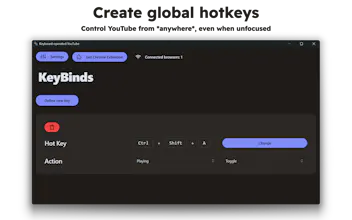
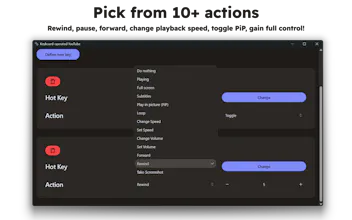
Keyboard-Operated YouTube is a small and lightweight desktop application that allows you to control YouTube (or any HTML5 video) via system global hotkeys. Register system-wide hotkeys to pause, rewind, forward, speed or slow down, and more!
No reviews yetBe the first to leave a review for Keyboard-Operated YouTube
Maker
📌
Hello 👋
This is Keyboard-Operated YouTube, a tiny desktop application that allows you to control YouTube (or any HTML5 vidoe player) using *system-wide* global hotkeys.
Many keyboards support simple Play/Pause hardware keys, however, they are fixed and may not be ergonomic for many users.
KBYT solves this problem by allowing you to register hotkeys and key combinations (e.g. CTRL+SHIFT+C) that you can trigger from anywhere, even if the browser window is not focused.
Say good-bye to continuous alt+tabbing, constant switching overhead, and broken pinky fingers. Whether you are following a coding tutorial, or taking notes from your lecture, or listening to a podcast in an intense battle, this app is for you!
For example, you can register the following hotkeys:
⌨️ CTRL+SHIFT+C ----> Toggle pause/play
⌨️ CTRL+SHIFT+Z ----> Rewind 5s
⌨️ CTRL+SHIFT+X ----> Forward 10s
⌨️ ⌘ + SHIFT + H ----> Take screenshot
⌨️ ALT+SHIFT+R -----> Increase playback speed by +0.1
⌨️ ALT+SHIFT+W -----> Decrease playback speed by -0.1
What are you waiting for? Give the app a try! It's a tried-and-tested way of boosting your productivity if videos are a core part of it.