No reviews yetBe the first to leave a review for JSON Formatter Blob Viewer
Maker
📌
Hey Product Hunt 👋
I'm the maker of jsonformater.com. It started with one frustration: someone would send me a giant, minified JSON blob — from a database column, a log line, an API response — and I'd have to hunt for a site to make it readable, without pasting sensitive data into some random server.
So I built a fast, privacy-first home for JSON. The part I'm most proud of:
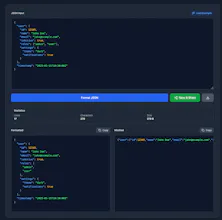
🫧 JSON Blob Viewer — paste or load any blob (even huge, deeply nested ones) and instantly explore it as a clean, collapsible tree.
🔗 Save & Share — save a JSON blob and get a shareable link. Perfect for bug reports, code reviews, and sending data to a teammate without Slack mangling it.
And around that, 30+ tools that all run 100% in your browser — your data never leaves your device:
• 🧹 Format, validate & diff JSON
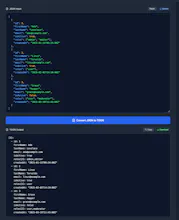
• 🔄 Convert JSON ↔ CSV, YAML, XML, Excel, TOML, TOON
• 🧑💻 Generate code for 8 languages (C#, TS, Go, Python, Java, Rust, Kotlin, PHP)
• 🔐 Decode JWTs, test JSONPath, generate JSON Schema, explain cron
Free, no sign-up, installable as a PWA.
I'd love your feedback — what do you usually do with a messy JSON blob, and what would make sharing it easier? 🙏
Report
How does the JSON to Excel conversion handle deeply nested arrays, and is there any file size limit for the blob viewer on the free plan?
Nested arrays in JSON → Excel: Right now it maps an array of objects to rows/columns from the top-level keys, so flat and shallow structures convert cleanly. Deeply nested arrays/objects aren't auto-expanded into separate columns or sheets yet — they get serialized into a cell rather than exploded out. So for heavily nested data the honest answer is: flatten it first, or use the JSON → CSV tool for a quick tabular view. Proper nested flattening (dotted columns like address.city, and splitting nested arrays into their own sheet) is high on my list — this is exactly the feedback I was hoping for. 🙌
Blob viewer size limit: There's no free/paid plan — the whole site is free, and the viewer runs 100% in your browser, so there's no server-side size cap. It's limited only by your device's memory and handles multi-MB JSON comfortably. One note: above ~100 KB the editor turns off live syntax highlighting to stay fast, but it still parses and views fine. (The only place a real size limit applies is the optional "save & share" links, since those get stored.)
Appreciate you digging in — anything you'd especially want the Excel export to handle?
Report
Maker
@nazife1727434 Update: just shipped this based on your comment 🚀
JSON → Excel now flattens deeply nested data into real columns instead of dumping it in one cell: • nested objects → dotted columns (address.city) • arrays of objects → expanded by index (items.0.sku, items.1.sku) • scalar arrays → joined into a single cell (tags → "admin, editor")
Thanks again for the nudge — this made the export genuinely useful for real-world nested JSON. (And to recap the other Q: the blob viewer is fully free & client-side, no size cap beyond your device's memory.)
Report
Love how clean the interface is, no clutter, just paste and instantly see formatted JSON. The one-click Excel conversion is a really thoughtful touch for anyone working with data exports.
Report
Maker
@bedirhanuoox Thank you, that means a lot 🙏 "Paste and instantly see it" was the whole goal — I was tired of tools that made me click through menus or sign up just to read some JSON.
Since you work with data exports, two things you might like: the export now flattens nested JSON into proper columns (dotted headers like address.city), and there's a JSON → CSV tool too if you'd rather pipe it straight into a DB or script. Also everything runs 100% in your browser, so it's safe for real/exported data.
Curious — what formats do you export to most? Always looking for the next thoughtful touch to add. 🙌
How does the JSON to Excel conversion handle deeply nested arrays, and is there any file size limit for the blob viewer on the free plan?
@nazife1727434 Great questions, thanks! 🙏
Nested arrays in JSON → Excel: Right now it maps an array of objects to rows/columns from the top-level keys, so flat and shallow structures convert cleanly. Deeply nested arrays/objects aren't auto-expanded into separate columns or sheets yet — they get serialized into a cell rather than exploded out. So for heavily nested data the honest answer is: flatten it first, or use the JSON → CSV tool for a quick tabular view. Proper nested flattening (dotted columns like address.city, and splitting nested arrays into their own sheet) is high on my list — this is exactly the feedback I was hoping for. 🙌
Blob viewer size limit: There's no free/paid plan — the whole site is free, and the viewer runs 100% in your browser, so there's no server-side size cap. It's limited only by your device's memory and handles multi-MB JSON comfortably. One note: above ~100 KB the editor turns off live syntax highlighting to stay fast, but it still parses and views fine. (The only place a real size limit applies is the optional "save & share" links, since those get stored.)
Appreciate you digging in — anything you'd especially want the Excel export to handle?
@nazife1727434 Update: just shipped this based on your comment 🚀
JSON → Excel now flattens deeply nested data into real columns instead of dumping it in one cell:
• nested objects → dotted columns (address.city)
• arrays of objects → expanded by index (items.0.sku, items.1.sku)
• scalar arrays → joined into a single cell (tags → "admin, editor")
Thanks again for the nudge — this made the export genuinely useful for real-world nested JSON. (And to recap the other Q: the blob viewer is fully free & client-side, no size cap beyond your device's memory.)
Love how clean the interface is, no clutter, just paste and instantly see formatted JSON. The one-click Excel conversion is a really thoughtful touch for anyone working with data exports.
@bedirhanuoox Thank you, that means a lot 🙏 "Paste and instantly see it" was the whole goal — I was tired of tools that made me click through menus or sign up just to read some JSON.
Since you work with data exports, two things you might like: the export now flattens nested JSON into proper columns (dotted headers like address.city), and there's a JSON → CSV tool too if you'd rather pipe it straight into a DB or script. Also everything runs 100% in your browser, so it's safe for real/exported data.
Curious — what formats do you export to most? Always looking for the next thoughtful touch to add. 🙌