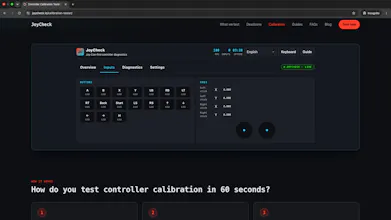
JoyCheck is a free browser-based gamepad tester that instantly checks stick drift, buttons, triggers, analog sticks and vibration for Xbox, PlayStation, Switch Pro, Joy-Con and generic controllers. No downloads, no sign-up and all testing happens locally in your browser.
No reviews yetBe the first to leave a review for JoyCheck
Maker
📌
Hi Product Hunt!
I'm Taimoor, the creator of JoyCheck.
I built JoyCheck because most controller testing websites either required downloads, showed too many ads, or didn't clearly visualize stick drift. I wanted a fast, privacy-first tool that anyone could open in a browser and use immediately.
JoyCheck supports Xbox, PlayStation, Nintendo Switch Pro, Joy-Con, and generic controllers. It lets you test buttons, analog sticks, triggers, vibration, and detect stick drift in real time using the browser's Gamepad API.
I'd really appreciate feedback on:
• Controller compatibility
• Browser support
• Features you'd like to see next
Thanks for checking it out!
Report
how accurate is the stick drift detection compared to the xbox accessories app or steam's built in tester
Report
Maker
@tubaenglerd8pm JoyCheck isn't "more accurate" than the Xbox Accessories app or Steam's tester , it reads a different layer. All three ultimately read the same stick sensor, but JoyCheck shows you the raw axis value the browser's W3C Gamepad API reports on every animation frame, with no deadzone or smoothing applied on top. So for drift it's very direct: center the stick, don't touch it, and if the on-screen value reads anything other than 0 (or the crosshair sits off-center), that's real drift, you're reading the literal number, not a pass/fail light.
Where it differs from the Xbox app: that one goes through Microsoft's driver stack and can also calibrate and adjust firmware. JoyCheck can't do that, it's a read-only diagnostic, not a repair tool. And because the browser samples once per animation frame (tied to your display's refresh rate), it's ideal for steady-state drift and deadzone checks but not a substitute for a true high-Hz polling-rate test.
So for "is my stick drifting, and how bad" you'll get the same truth as those tools in about 10 seconds with nothing to install. Happy to go deeper on any specific controller.
Report
finally a dead simple way to test my pro controller stick drift without installing anything. The vibration test was a nice touch too, everything responded instantly in my browser.
Report
Maker
@yusufwond Thank you, Yusuf! That was exactly the experience I wanted to create, just plug in your controller and start testing without installing anything. I'm glad you found the vibration test useful as well. If there's any other diagnostic you'd like to see added, I'd love to hear your suggestions!
Report
Plugged in my old Xbox controller and the drift test picked it up right away without me downloading anything. Nice that everything runs locally too.
Report
Maker
@neefz2n Thanks so much, Neşe! I'm really happy it detected your Xbox controller right away. Making the tool work instantly in the browser without downloads was one of my biggest goals. If you run into any issues or have ideas for new features, I'd love to hear them.
how accurate is the stick drift detection compared to the xbox accessories app or steam's built in tester
@tubaenglerd8pm JoyCheck isn't "more accurate" than the Xbox Accessories app or Steam's tester , it reads a different layer. All three ultimately read the same stick sensor, but JoyCheck shows you the raw axis value the browser's W3C Gamepad API reports on every animation frame, with no deadzone or smoothing applied on top. So for drift it's very direct: center the stick, don't touch it, and if the on-screen value reads anything other than 0 (or the crosshair sits off-center), that's real drift, you're reading the literal number, not a pass/fail light.
Where it differs from the Xbox app: that one goes through Microsoft's driver stack and can also calibrate and adjust firmware. JoyCheck can't do that, it's a read-only diagnostic, not a repair tool. And because the browser samples once per animation frame (tied to your display's refresh rate), it's ideal for steady-state drift and deadzone checks but not a substitute for a true high-Hz polling-rate test.
So for "is my stick drifting, and how bad" you'll get the same truth as those tools in about 10 seconds with nothing to install. Happy to go deeper on any specific controller.
finally a dead simple way to test my pro controller stick drift without installing anything. The vibration test was a nice touch too, everything responded instantly in my browser.
@yusufwond Thank you, Yusuf! That was exactly the experience I wanted to create, just plug in your controller and start testing without installing anything. I'm glad you found the vibration test useful as well. If there's any other diagnostic you'd like to see added, I'd love to hear your suggestions!
Plugged in my old Xbox controller and the drift test picked it up right away without me downloading anything. Nice that everything runs locally too.
@neefz2n Thanks so much, Neşe! I'm really happy it detected your Xbox controller right away. Making the tool work instantly in the browser without downloads was one of my biggest goals. If you run into any issues or have ideas for new features, I'd love to hear them.