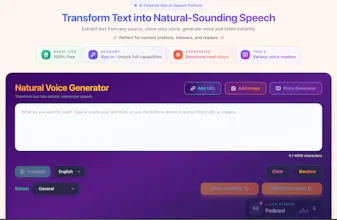
IReadAll can transform content into natural spoken language. Whether you're converting articles, blog posts, text books, or any web content, our advanced AI ensures high-quality, natural-sounding voice output. Simply paste any URL or upload any images into the input field above, and our system will automatically extract the text content and convert it into speech.Try it out with any website URL or scanning any physical books to experience the power of IReadAll!
No reviews yetBe the first to leave a review for IReadAll-read texts with natural voice
Maker
📌
Hi Product Hunt!
I'm Dim, the maker of IReadall. As a developer, I realized that staring at screens all day was taking a toll on my eyes. I wanted a way to consume content—articles, books, and even photos of text—without the visual fatigue. But existing TTS (text-to-speech) tools sounded too robotic and lacked the "human touch."
That’s why we built IReadall.
IReadall isn't just a screen reader; it's an emotion-based audio companion. We focused heavily on:
Emotional AI: Voices that actually convey feeling, not just monotone reading.
OCR Capabilities: Snap a photo of a book page or document, and listen to it instantly.
Accessibility: Designed for those with visual impairments or anyone dealing with eye strain.
We are offering a special deal for the PH community today! I’d love to hear your feedback on the voice quality and the user experience.
Thanks for checking us out!
Report
Maker
Transform Web Text into Natural-Sounding Speech and Listen Instantly.
Turn Any Webpage into an Immersive Audio Experience Point, click, and listen! Turn webpages into natural audio with synchronized word highlighting in English, Spanish & more. Tired of staring at screens all day? Give your eyes a break and let the web read to you. Whether you are navigating long articles, studying dense research, or simply want to multitask while catching up on the news, this lightweight extension transforms any text into a natural, human-sounding audio experience. It’s designed to boost your focus, improve reading comprehension, and seamlessly fit into your daily workflow. ✨ Core Features 🗣️ Lifelike, Natural Voices Say goodbye to robotic, clunky text-to-speech. Enjoy premium, human-like voices that read with natural intonation and emotion, making even the longest articles a pleasure to listen to. 🖱️ Click & Read (Point-and-Speak) Total control is right at your fingertips. Don't want to listen from the top? Simply click on any paragraph, sentence, or word, and the voice will instantly start reading exactly where you pointed. 🖍️ Synchronized Word Highlighting Follow along effortlessly. As the voice reads, the corresponding words are highlighted in real-time on your screen. This visual-audio sync is a game-changer for maintaining focus, retaining information, and avoiding losing your place. 🌍 Global Multilingual Support Read the web in the language of your choice. We fully support high-quality voice reading in English, Spanish, Portuguese, German, French, Italian, and more. Perfect for native speakers, expats, or anyone actively learning a new language. 💡 Why You Should Install This Extension Supercharge Your Productivity: Listen to articles while working, cooking, or browsing other tabs. Enhance Language Learning: Improve your listening skills and pronunciation by hearing native-sounding voices while reading the highlighted text. Reduce Digital Eye Strain: Protect your vision by letting your ears do the heavy lifting after a long day of screen time. Accessible Reading: An essential tool for users with ADHD, dyslexia, or anyone who simply prefers auditory learning over traditional reading. Add it to Chrome today for free and experience the smartest way to consume content on the web!




Transform Web Text into Natural-Sounding Speech and Listen Instantly.
Turn Any Webpage into an Immersive Audio Experience Point, click, and listen! Turn webpages into natural audio with synchronized word highlighting in English, Spanish & more. Tired of staring at screens all day? Give your eyes a break and let the web read to you. Whether you are navigating long articles, studying dense research, or simply want to multitask while catching up on the news, this lightweight extension transforms any text into a natural, human-sounding audio experience. It’s designed to boost your focus, improve reading comprehension, and seamlessly fit into your daily workflow. ✨ Core Features 🗣️ Lifelike, Natural Voices Say goodbye to robotic, clunky text-to-speech. Enjoy premium, human-like voices that read with natural intonation and emotion, making even the longest articles a pleasure to listen to. 🖱️ Click & Read (Point-and-Speak) Total control is right at your fingertips. Don't want to listen from the top? Simply click on any paragraph, sentence, or word, and the voice will instantly start reading exactly where you pointed. 🖍️ Synchronized Word Highlighting Follow along effortlessly. As the voice reads, the corresponding words are highlighted in real-time on your screen. This visual-audio sync is a game-changer for maintaining focus, retaining information, and avoiding losing your place. 🌍 Global Multilingual Support Read the web in the language of your choice. We fully support high-quality voice reading in English, Spanish, Portuguese, German, French, Italian, and more. Perfect for native speakers, expats, or anyone actively learning a new language. 💡 Why You Should Install This Extension Supercharge Your Productivity: Listen to articles while working, cooking, or browsing other tabs. Enhance Language Learning: Improve your listening skills and pronunciation by hearing native-sounding voices while reading the highlighted text. Reduce Digital Eye Strain: Protect your vision by letting your ears do the heavy lifting after a long day of screen time. Accessible Reading: An essential tool for users with ADHD, dyslexia, or anyone who simply prefers auditory learning over traditional reading. Add it to Chrome today for free and experience the smartest way to consume content on the web!