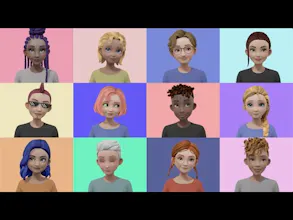
Hyprmeet is an avatar video chat app for Zoom & OBS. With real-time facial mocap technology, you can create personalized avatars and animate them on your video call/streaming software. Enjoy! π
Very cool, but can't seem to get it to work on Mac (Catalina 10.15.6). The app works, avatar creating works, etc, but in zoom or any other app "Hyprmeet" doesn't show as an option for camera selection.
Report
Same for me! I'm on Mac Catalina 10.15.5. I can see the Hyprmeet camera when doing QuickTime Player recordings, but not in Zoom or Google Meet.
@david_fant@krsj_official I'm so sorry that your first try out did not go well ππ We are suspecting that your Zoom or Google Meet might not be the latest version. Will you let me know if it doesn't work even after updating Zoom & Google Meet to solve this issue?
I am getting this warning when I downloaded this software in Microsoft Edge, "Microsoft Defender SmartScreen was not able to scan
Hyprmeetlnstaller.v1.exe. You shouldn't keep it unless you're sure it's safe". ?
@nagendradevara1 First, thanks for trying it out and reporting the warning π I've just asked our dev team and we will get back to you on why it's happening.
@nagendradevara1 Hi there again! We have verified that our current exe file is signed with the proper signature. Can you update Microsoft Edge to the latest version and give it a try again?
Report
@jannna - πππ Kudos and thank you to you and your team! Overall the creation experience was intuitive and the avatars are pretty high quality, although they all end up looking like teenagers. Biggest blocker preventing me from using Hyprmeet for live streaming: the avatar looks silly when I'm talking -- the mouth movements are unnatural at best. Any plans to improve animations for talking? π€
Other blockers: 1) having to frequently Calibrate so a smile looks like a smile instead of something weird 2) lack of support for full range of emotions -- avatars seem to be incapable of displaying that looks like a negative emotion (e.g., fear, disgust, sadness).
Again, great start! I'm looking forward to seeing how Hyprmeet evolves and I'm on the lookout for non-streaming problems I can solve with Hyprmeet today.
@adam_ruf Hi, Adam! Thanks for this awesome feedback! ππ The dev team is constantly working on fine tuning the tracking quality and animation for Hyprmeet. If you have a free moment, can you send us an email through hyprmeet@hyprsense.com with your computer specification and hardware (webcam included)? This will help us troubleshoot your issue to give you a better experience.
Report
@jannna, great fun product. It does not seem to work on MacOS Catalina, downloaded and the app will not open, and unresponsive. Any ideas?
Hey Product Hunters - we are so excited to officially launch Hyprmeet on Product Hunt!
Our team started the Hyprmeet project as the digital-self world boomed over the last few years with advancements in machine learning and computer graphics. Peopleβs recognition, comfort, and need to operate in a digital world have given life to the world of 3D avatars. The ongoing pandemic has made people more accustomed to working from home, taking classes remotely, having dinner with family and friends online, and finding their identity in this digital world. That's why we built Hyprmeet.
We believe in the following: Hyprmeet enables you to express your identity with a personalized 3D avatar, makes your video call more interactive, and increases the accessibility to the immersive digital experience. Using facial recognition technology, we've built a platform that captures your facial expressions in real-time with just a webcam and creates a dynamic 3D avatar, personalized for you. We are convinced that video calls are the most familiar digital space where people interact and communicate, and we are more convinced that this trend will continue, becoming the new norm. We are focused on making this digital experience as immersive as possible; so we are rolling out Hyprmeet with the mission of transforming your digital world from a transactional to a dynamic experience most simply and easily.
To give Hyprmeet a try, download the app from our website βhyprmeet.comβ for free! Like other fellow makers here, your feedback is much needed & appreciated to us in any kind - comment us for any questions and suggestions!
We hope you enjoy using Hyprmeet as much as we have been (our own internal meetings have definitely become far more entertaining). π§ββοΈ Thanks!
Report
@jannna Thank you for the wonderful product
But when I start it, I don't see the video.
OS version is Mac 10.14.16
(Japanese user)
Report
Super cool, very fun to stream with. I hope more updates are coming. Would love hand tracking & more hair styles.
I think the face tracking is literally the best I've ever seen so far even though its not flawless. I literally have not seen any better. It tracks eyes pretty perfectly. It kinda bugs out when I look to the side the nose will scrunch up. It would be cool if it could be improved even more but I love it so far.
It is hard to do sad/mad expressions though~
I love the backgrounds because they have different lighting I would love if we could apply certain lighting to different backgrounds? Like If you could have lighting with the greenscreen option that'd be awesome the face just looks so much more alive with some of the other backgrounds which is a shame because I love the green screen one :)
Report
This is awesome fun!
It would be good if it worked with secondary camera inputs, such as reincubate camo studio https://reincubate.com/camo/
Self Test by Ahead App
Hyprmeet for Zoom & OBS