Launching today

hovernotch
Your Mac's notch, alive: music, files and your coding agents
1 follower
Your Mac's notch, alive: music, files and your coding agents
1 follower
hovernotch turns your Mac's notch into a live island. Now Playing with artwork, scrubber and synced lyrics; AirPods and battery; timers, meetings with a Join button; volume and brightness HUDs; a lock-screen player. Drag files up to the shelf, search a clipboard history that skips passwords. For developers: approve your coding agent's requests, answer its questions and review its plans from the notch. No notch? It floats. No account, no analytics, nothing uploaded.


Payment Required
Launch Team

Render: Get up to $100K in startup creditsThe fastest way to launch and scale your startup in the cloud
Promoted
Hi Product Hunt 👋 I make small Mac apps at tealmac. hovernotch turns your Mac's notch into a live island. Here is everything in 1.0:
🏝 The island
• Cut to your notch's exact shape. No notch, an iMac or an external display? It floats just under the menu bar (notch, island or off, per display)
• Point at it to open, click to pin, two-finger swipe, or ⌥⌘N from anywhere. Arrows and 1–9 switch tabs
• Choose a finish and an accent colour
🎵 Music
• Artwork, a visualiser tinted by the cover, scrubber and every control, for whatever plays on your Mac
• Synced lyrics, with the current line riding along in the closed notch
• Pop-out mini player you can park anywhere
🔒 Lock screen
• A padlock settles into the notch, turns green and folds away when you unlock (or a fingerprint ring)
• Under the clock: player with scrubber, volume and the lyric line, a charging bolt, and optional battery, AirPods, meeting and weather tiles
🤖 Coding agents
• Your terminal and editor agent sessions in one list
• Allow, deny or always-allow tool calls, answer questions with buttons, approve a plan or send it back with a note
• No answer in 60 seconds? It goes back to the terminal, so nothing gets stuck
• Click a session to jump to its terminal tab or tmux pane
⚡ Live activities
• Charging with the charger's wattage, AirPods with each bud's battery, timers, downloads, meetings with a Join button, microphone and camera in use, Focus, Wi-Fi, VPN or a lost connection
🔊 HUDs
• Volume, brightness and keyboard backlight redrawn in the island, in four styles
• Per-app volume (beta, macOS 14.2+)
📂 Shelf
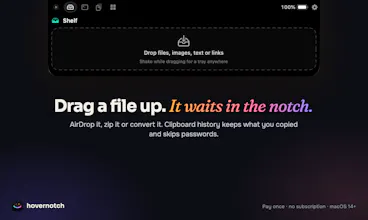
• Drag a file up to the notch, or shake while dragging for a tray under your cursor
• AirDrop it, zip it, convert it, copy the text in it or lift out the background
📋 Clipboard history
• Text, links, colours, images and files, searchable
• Skips concealed copies and password managers. Add your own exclusions or pause for an hour
🧩 Widgets
• A calendar you can type to, weather, live system stats, Pomodoro, stay-awake, a mirror before calls, quick notes, a teleprompter, your Shortcuts and a colour picker
🛠 For developers
• Local bridge, URL scheme and command-line tool: your scripts can post activities, flash a HUD or add to the shelf, once you allow them
🔐 Privacy
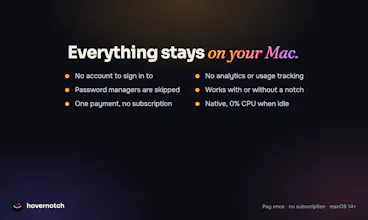
• No account, no analytics. Shelf, clipboard, notes and agent sessions stay on your Mac
• Goes online only for the licence check, and for weather or lyrics if you turn them on
• About 0% CPU when idle
$6.99 once during launch week (until Sun 25 Oct), then $11.99. One Mac, macOS 14+, Apple silicon and Intel. What should the island show next?