
Gumroad Mailerlite Integration
Connect your Gumroad store to MailerLite
3 followers
Connect your Gumroad store to MailerLite
3 followers
If you sell on Gumroad and email through MailerLite, you've probably wrestled with CSV exports or manual handling. This fixes all of that. Every Gumroad sale flows into MailerLite within seconds — buyers added to the right groups, custom fields populated, refunds handled your way. Build smart rules like "VIP if amount > $100" or reward bundle buyers automatically. Test in dry-run, retry failures with one click. Setup takes 30 seconds.
Payment Required
Launch Team

Viktor.comAn AI coworker that actually does the work
Promoted
Gumroad MailerLite Integration
Turn every Gumroad sale into the right MailerLite subscriber, automatically.
What it does
It connects your Gumroad store to MailerLite. Every time someone buys something, they get added to the right email list instantly. No more copying data by hand or losing customers.
Core features
Automatic sale-to-subscriber sync : Whenever you get a new order on Gumroad, that customer's data gets added to your MailerLite group automatically. No extra work from you.
Product → Group mapping : You can set up different MailerLite groups for different Gumroad products. For example, if you set the group "Course A Students" for your product "Course A", then when someone buys Course A, they go straight into that group. If they buy both Course A and Course B, they go into both groups. Simple.
Global fallback group : You can set one default group that catches buyers from any product you haven't mapped yet. This is perfect for building an "All Customers" list without having to set up every single product.
Conditional Routing Rules : You can build smart rules using any sale data. For example: "If amount is $100 or more → add to VIP group", "If country is USA → add to US list", "If product name contains 'Pro' → add to Pro Tier list". You can use multiple rules, and buyers will match all that apply.
Combo Rules : Reward customers who buy bundles. For example: "Anyone who has bought Product A AND Product B → add to Bundle Buyers group."
Custom Field Mapping : You can pass any Gumroad data into MailerLite custom fields — like country, purchase amount, product name, variant, purchase date, or your own checkout fields (Company name, Phone, etc.). You can also change the format, like turning cents into dollars, keeping only the date, or making text uppercase.
Auto-create groups for new products You launch a new product and forget to map it? No problem. If you enable this option, our software can automatically create a matching MailerLite group the first time someone buys it.
Refund handling, your way : When Gumroad processes a refund, you choose what happens: unsubscribe the buyer, move them to a "Refunded" group, or do nothing. Either way, their history stays saved.
Built for reliability :
Idempotent by design: Sometimes Gumroad sends the same order notification twice. GMSync recognizes duplicates and never adds the same buyer twice.
One-click retry for failed events : If MailerLite has a hiccup or you misconfigured a group, failed events show up under History → Failed Events with the exact error and a Retry button. Fix the issue, click Retry, done.
Detailed event history : Every important action is logged: who got synced to which group, why a rule matched, what failed and why. It cleans itself after 7 days so your database stays small.
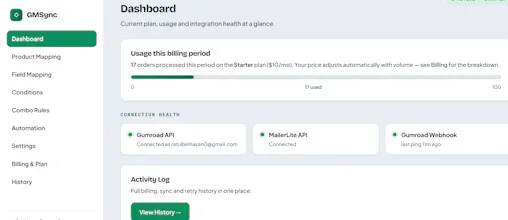
Live integration health : You can see at a glance if your Gumroad API, MailerLite API, and webhook connection are working. The dashboard tells you instantly if something needs your attention.
Built for self-serve
30-second setup : Paste your Gumroad token, paste your MailerLite key, set the webhook URL that Gumroad gives you — you're live.
Test mode (dry-run) : You can test your rules and mappings without touching your real MailerLite lists. See exactly which groups a sale would go to before turning it on for real.