Google Sheets add-on that fixes the axes and gridlines on every chart in one click. Free with 25 scales a month, no signup required. With Pro you get unlimited scales and auto-update feature.
No reviews yetBe the first to leave a review for Gravera
Maker
📌
Hey Product Hunt!
Sharing a side project I built this year to learn more about building with AI as a non-technical person.
Background on why: I have spent years in spreadsheets, mainly Excel. But last year I started working for my new employer that used Google Sheets. I was super annoyed by having to always manually adjust the vertical axis and gridlines on graphs to be able to extract any good enough insight.
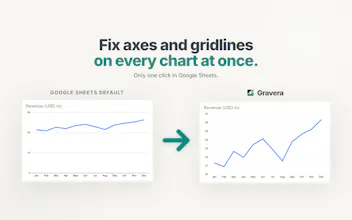
Exact problem: Google Sheets picks chart axes min/max that waste half the chart on empty space. A second smaller problem is that by default there are also too few gridlines to read the values accurately. In financial modelling for example this is something you must always do by hand, one chart at a time, which takes a lot of time.
Solution: Gravera is an add-on that fixes the axes and gridlines on every chart in one click. It's free with 25 scales a month, no signup required. With Pro you have unlimited scales, and you can turn on auto-update so the charts re-scale themselves whenever your data changes.
It's a niche tool for people deep in the Google Sheets trenches, but I'd still love to hear your feedback!
Report
Does the auto-update feature only refresh when the spreadsheet is opened, or does it push changes to the chart in real time as cell values change?
Finally a fix for those messy Google Sheets charts that always come out squished. Clicked through a couple of mine and the gridlines actually lined up the way I wanted, which is more than I can say for the default settings.
Report
finally a simple fix for messy sheet charts, clicked once on a chaotic dashboard and the axes snapped into place like magic
Does the auto-update feature only refresh when the spreadsheet is opened, or does it push changes to the chart in real time as cell values change?
@edanurbatu11295 real time
Finally a fix for those messy Google Sheets charts that always come out squished. Clicked through a couple of mine and the gridlines actually lined up the way I wanted, which is more than I can say for the default settings.
finally a simple fix for messy sheet charts, clicked once on a chaotic dashboard and the axes snapped into place like magic