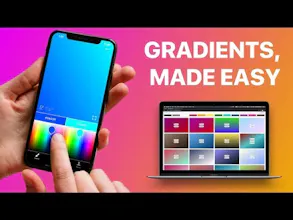
Gradients Maker solves the most painful problem when designing gradients: finding colors that blend well together. The app lets you use your fingers to pan across two color pickers simultaneously and refreshes your gradient in real time.
Hey Product Hunters! 👋
I’m Ed, a self-taught iOS developer from Belgium 🇧🇪, currently based in Barcelona, Spain. 🇪🇸
Last summer, I left my job at Google to go indie and focus on my iOS apps full time. Today, I’m excited to introduce you to Gradients Maker.
🤯 **Problem**
As indie developers, we are obviously developers but also designers… and marketers and user support agents and… You get the point, right? 🤠👨🏻💻
I’ve always enjoyed designing but there has always been an area where I struggled: picking colors for gradients. Finding color pairs for gradients using tools like Sketch is very hard. You pick the first color, then move to the other color selector and pick another, but they never really match. Basically: an endless back and forth which gives nothing but headaches. 🤯😤
💡 **Idea**
The real problem with these tools is that I couldn’t iterate on both colors simultaneously and fast enough. So the idea was simple, I could build an app that showed two color pickers and a gradient preview on the same screen. With one finger on each color picker, I would pan around like with joysticks and my gradient would update in real-time. Simple. 🤩🥳
As I'd drag each finger, it would continuously update one of the selected colors which in turn would refresh the gradient. This way I could easily try thousands of combination until I’d find a gradient that looked nice. Awesome. 😎
🛠 **Solution**
So I started building it and shared my progress on Instagram. Others developers sent me suggestions which led to a second core feature: extracting colors from pictures to create gradients. I've also built a way to export/share the gradients you created and even use them as background for your Instagram Stories. 😀🥳
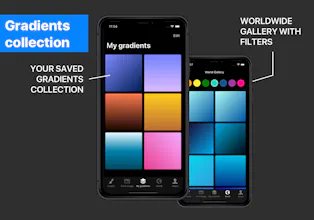
A couple of weeks ago, I noticed that more than a thousand gradients had been created on the app. So I decided to bring these gradients to the web and I roughly cobbled together my **very first** web app. There will be bugs and glitches, be indulgent. 👌😝
😇 **Is it free?**
The iOS app is free and both core features are free as well. The premium plan will allow you to unlock advanced options and remove ads/watermarks. The web app is entirely free because I have no idea how to gate features on the web. 🤣💁🏼♂️
🤓 **What’s next?**
I'm hoping to get some feedback from you guys with this launch to see if I should double down my efforts or move onto the next idea. What do you think? 😀😇
Thanks for reading me and have a great day. 👋🤙
Edouard
The tools solves an issue that may sound trivial but is a huge loss of time for anyone that needs to create beautiful gradients: not being able to change both colors at the same time.
With this tool, I can use both thumbs to change both colors at the same time and preview them in real-time. Much much faster than any desktop design tool (I use Sketch).
Thanks you Edouard!
Pros:
- Solves a trivial but real issue for anyone creating gradients
- Ability to save gradients
- Inspiration from community gallery
Cons:
- More of a feature request than a con: would love a favorite/do not like buttons on the web gallery. Thanks!






Gradients Maker
Evoday 2023 for iOS
The tools solves an issue that may sound trivial but is a huge loss of time for anyone that needs to create beautiful gradients: not being able to change both colors at the same time. With this tool, I can use both thumbs to change both colors at the same time and preview them in real-time. Much much faster than any desktop design tool (I use Sketch). Thanks you Edouard!
Pros:- Solves a trivial but real issue for anyone creating gradients - Ability to save gradients - Inspiration from community gallery
Cons:- More of a feature request than a con: would love a favorite/do not like buttons on the web gallery. Thanks!
Gradients Maker
Gradients Maker
SnipBox
Quick and simple way to make gradients with the tip of your fingers
Pros:Great tools with a super intuitive design
Cons:I don't see any cons. I have not seen any better alternatives yet
Gradients Maker
Gradients Maker
Polamatic by Polaroid
Gradients Maker
fyi
Gradients Maker