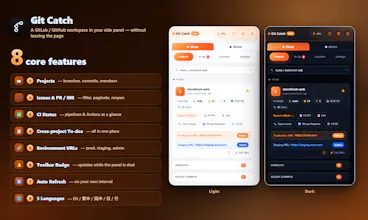
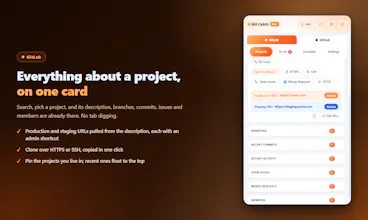
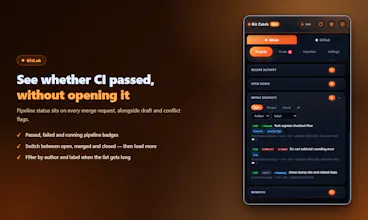
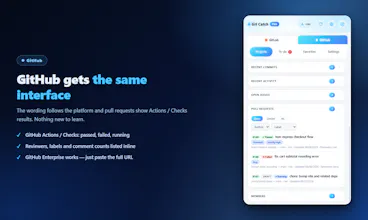
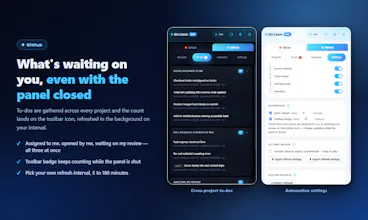
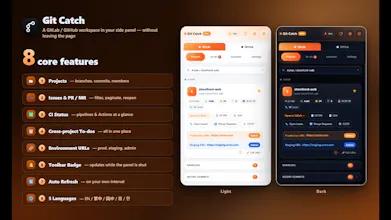
Slides in from the right of your browser. Switch GitLab/GitHub in one click, search a project, and instantly see its issues, PRs/MRs, commits, branches, members and environment URLs. Your token never leaves the browser.
Fin Startups get Fin free for a year + 93% off Intercom
Promoted
Maker
📌
I built GitCatch because I got tired of constantly switching between GitHub/GitLab tabs just to check different parts of a project.
When working across multiple repositories, I often needed to quickly check issues, PRs/MRs, branches, commits, CI status, or find a specific project. The information was already there, but it was scattered across many pages, which made the workflow more fragmented than it needed to be.
So I started thinking: what if the most important Git information was always one click away, directly inside the browser?
That idea became GitCatch — a browser sidebar that brings GitHub and GitLab projects into one workspace.
When you only have a few projects, saving their links in browser bookmarks is usually enough. But as the number of projects grows, bookmarks quickly become cluttered and difficult to manage.
That's why I built GitCatch to connect project information directly in one place. You can also customize the development, staging, production, frontend, and backend URLs for each project, and organize frequently used projects into your own custom favorites.
Instead of searching through bookmarks or multiple browser tabs, you can switch between projects quickly and keep everything you need within reach — saving time and keeping your workflow organized.
During development, the idea evolved beyond simply displaying repositories. I added project search, issues and PR/MR tracking, branches, commits, CI status, favorites, recent projects, cross-project tasks, environment URLs, and notifications through the browser badge.
One thing I cared about from the beginning was privacy. GitCatch doesn't need a backend to proxy your Git data. Your tokens stay in your browser, and requests go directly to your GitHub/GitLab server.