
GHSwitch
Switch Git profiles without leaving your flow
10 followers
Switch Git profiles without leaving your flow
10 followers
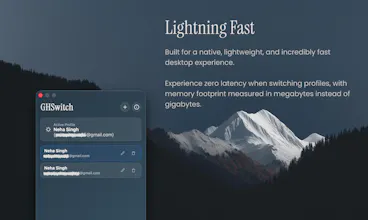
GHSwitch is a lightweight desktop app for macOS and Windows that lets you instantly switch between multiple Git user configurations from your system tray. No more git config commands — just click your profile in the tray. Add profiles with a name, email, and optional signing key (GPG/SSH). Switch between work, personal, and open-source identities in one click. Lives quietly in your system tray, starts at login if you want, and stays out of your way.


Hey Product Hunt! 👋
I built GHSwitch because I lived the pain daily. I maintain separate Git identities for my day job, personal projects, and open-source contributions. Every time I switched contexts, I'd run `git config --global user.name`, `user.email`, and `user.signingkey` by hand. And occasionally I'd forget — committing to a work repo with my personal email, or vice versa.
I literally had a sticky note on my monitor with the commands.
I looked for existing solutions. There are CLI tools, shell scripts, and git aliases — but nothing that lived in my system tray and worked with zero friction. I wanted something that was always there, always one click away, and never required me to open a terminal just to switch contexts.
So I built GHSwitch.
How it works: It lives in your system tray — macOS menu bar or Windows taskbar. Click it, see all your profiles, click the one you want. Done. Your Git config is updated instantly.
Profiles are stored in your `~/.gitconfig` under `ghswitch..*` keys — the same config file Git already uses. No proprietary database, no cloud sync, no accounts. You own your data completely.
Pricing: GHSwitch is launching completely for free! I've set it up on Polar.sh with a "pay what you want" model defaulting to $3. If you just want to use the app, simply change the amount to $0 and download it for free. If you find it helpful and want to support the project, any contribution is hugely appreciated!
What's next: I have a few ideas I'm exploring — per-repository auto-detection based on the remote URL, custom Git config overrides per profile, and maybe a CLI companion for power users. I'd love to hear what would make this tool most valuable for your workflow.
This started as a personal tool to scratch my own itch. I hope it saves you as much friction as it's saved me. Happy to answer any questions and hear your feedback!
— Neha Singh & Achuth Hadnoor
@neha_singh84 This saved my ai tokens and make it one click switch. It was great collaborating with you yayy!!
Does it also swap the SSH config block or GPG agent signing behavior automatically, or do I still need to manage those separately when switching profiles?
@mehmet_ayd30839 No — it does not swap SSH config blocks or GPG agent behavior. It only modifies ~/.gitconfig, setting user.name, user.email, and optionally user.signingkey. SSH (~/.ssh/config) and GPG agent configuration must be managed separately.
how does it handle conflicts if two profiles share the same git config scope, and is there a sync option for the profiles across multiple machines
How does it handle conflicts when two profiles share the same git config scope and you switch mid-repo, does it just rewrite local config or actually stash anything first?