Fover for Mac

Speed up files movement & storage cleanup

19 followers

Fover is a macOS app designed to speed up file moving, saving you time and boosting productivity. Whether you're organizing your downloads, sorting project files, or cleaning up your storage, Fover is the tool to get it done quickly.
Fover for Mac gallery image
Free Options
Launch tags:Macβ€’Productivityβ€’Menu Bar Apps
Launch Team
Framer
Framer
Launch websites with enterprise needs at startup speeds.
Promoted

What do you think? …

Kamil Daniel
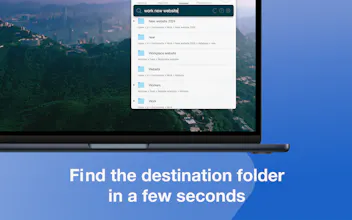
Hi PH πŸ‘‹, I'm excited to introduce you Fover, my indie app that gives a fresh solution for file management dedicated to Macs. The idea was simple: speed up daily basic work, which is file movement, without any limitation. So, everything is done in three steps: dragging files and folders, searching for the destination folder, and pressing the move or copy button. During the implementation, I realized that it would be good to add more... So, * To keep the Downloads and Desktop folders clean, I've decided to add Tracked Folders - the ability to add files from any folder directly from my app without drag and drop. * To preview the files from Tracked Folders and add to the move queue - I've added Quick Look with an Enter hotkey to quickly add files to the move queue. * To notify about new files - badge on the app icon in the Menu Bar and on new files. * Renaming queued files and destination folders. * Create a New Folder button - as a crucial part for new things. * Ability to create a file with selected text, dragging mail attachments, images from the web, or the Photos app. * Very fast search of destination folder - based on Mac Spotlight and matches not only folder names but also paths. * Recent destination folders - manageable by a user but also based on your recent actions. I believe all those features redefine file movement and speed up the process without losing any capabilities πŸš€. The app is free but only for 2 files in the moving queue. For $5 per year, you can remove this limitation. I've decided to go with a subscription for a few reasons. The first is that I have a huge backlog of features that I want to add (the dark mode will be one of the first😊). The second is that I will not create other versions of the app like Fover 2, Fover 3... from my point of view, it's not fair. The last one, the ability to check how the app works without any costs. I will be very happy if you give a chance to my third child and check it out. I'd love to hear your feedback and thoughts, maybe even ideas for features and improvement! I would like to share some promo codes with you all for a free one-year subscription LFTYLPFFAA6P 6FTAYPPHTXEA PNXY6YERR9FM NTHNL3WR7P6P HPX3JRELKM7J APFYX9FRXN4H ATLW7MH3MXNN EE9E77TK3FYY FMWHYATT49AA TANYNFL7EE9A
MichaΕ‚ Kowalski
Thanks, Can be helpful with my daily basis. And good luck!
Kamil Daniel
@michal_kowalski I hope it will. Thanks for the support!