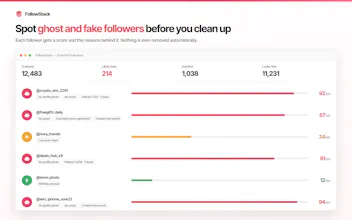
Every "who unfollowed me" tool wants your Instagram password. FollowStack never asks for one — it is a Chrome extension, so it uses the session you are already logged into and analyses everything locally. See who unfollowed you since your last check, who does not follow back, and which followers are bots or ghosts, scored on profile photo, follower ratio, post count and username. Export to CSV, Excel or JSON, schedule stories from desktop, download media. Free tier. 51 languages.
Tines The single, secure environment for agents, apps, and automations.
Promoted
Hunter
📌
Hey Product Hunt 👋
I built FollowStack because every "who unfollowed me" tool I tried wanted my Instagram username and password.
That's not a small ask. Those sites log into your account from their own server, Instagram sees an unrecognised login from a country you've never been to, and the account gets flagged or locked. I watched it happen to people around me more than once.
The thing is, it's a solved problem in the wrong place. A browser extension doesn't need a password at all — you're already logged in. So FollowStack runs on your own session, in your own browser, and no follower data ever leaves your machine. There's no account to create and no server holding your list.
The hardest part wasn't the analysis, it was the pacing. When Instagram throttles you it doesn't return an error — it returns a 200 with an HTML login page, so everything looks fine while nothing works. Teaching the extension to recognise that, back off properly, and tell you the truth instead of silently failing took longer than every feature combined. It's also the difference between a tool you can leave running and one that gets your account action-blocked.
Free tier covers unfollower tracking, non-followers and the bot scan with a daily cap.
Would love to hear what you'd want added — and if you find a bug, say so here and I'll give you premium for free.