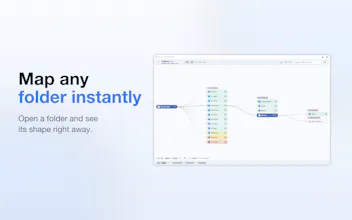
Folders Flow brings mind-map navigation to the folders and files already on your Mac. Keep multiple branches visible, jump between paths without losing context, and explore messy projects, shared folders, or large archives without opening more Finder windows. Everything stays on your Mac, with no analytics or data collection.
Fin Startups get Fin free for a year + 93% off Intercom
Promoted
Maker
📌
I'm the maker and developer of Folders Flow, a Mac app that lets you explore your folders like a mind map.
Some Mac folders are hard to navigate. They can be deep, messy, created and shared by someone else, or organized with names and a hierarchy that no longer feel obvious.
In Finder, you navigate one path at a time. Once you follow it, switching to another branch usually means going back and drilling down again. To move efficiently, you need to know or remember where every path leads.
Folders Flow keeps the paths you open visible on the map. You can jump from one branch to another in one click without losing the surrounding structure. It may look unusual at first, but it quickly becomes intuitive and oddly satisfying to use.
Finder is the obvious alternative for browsing Mac folders. Its column view can show one branch across several levels, but it does not keep several opened branches visible together as a persistent map.
MindNode is the closest comparison for the visual experience. It lets you create and explore mind maps for ideas, while Folders Flow applies that same kind of spatial navigation to the folders and files already on your Mac.
Folders Flow sits between these two approaches. It brings mind-map navigation to your real folder structure while remaining a companion to Finder.
I care about my own privacy, so I respect yours too. Folders Flow does not collect any data, including analytics or usage statistics. Your folder data stays on your Mac and is not sent anywhere.
macOS may ask you to allow Folders Flow to access a folder. This is normal. The permission only allows the app to read and display the folder you selected and its contents as a map. It does not give Folders Flow access to unrelated folders. The app only modifies files when you explicitly request a file action.
There is a 14-day free trial. After that, it is $0.99/month or $9.99 lifetime, depending on your App Store region.
I'd love feedback, especially from people who work with messy project folders, client folders, shared drives, or large local archives... and also from people who regularly use mind maps: does this way of navigating folders feel natural to you?