
Flyout
Rich-text notes that fly out from your Mac's screen edge
115 followers
Rich-text notes that fly out from your Mac's screen edge
115 followers
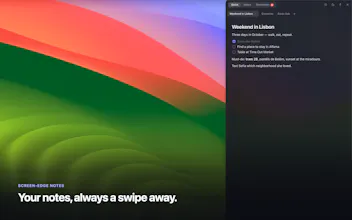
Nudge your screen edge — or press ⌥⌘N — and a full rich-text editor flies out over whatever you're doing. Checklists, reminders, folders, images, code blocks, iCloud sync. Native macOS, not Electron. Lifetime license, 7-day free trial. Every note is plain Markdown underneath. Your notes never touch our servers.





Free Options
Launch Team / Built With


Customer.ioAutomate Messaging Everywhere — Startups Get 12 Months Free
Promoted


the "flat folders, no nesting" call is the right instinct for a capture tool - nesting is where these things always turn into filing cabinets nobody maintains. curious how it holds up once someone has a few hundred notes in one flat folder though - is search the only way back in at that point, or is there something like tags/pins to cut across folders without reintroducing hierarchy
@galdayan Good question, and the honest answer: today it's folders + pins + search, no tags yet.
Pins already cover a chunk of what you're describing, pinned notes sit in their own section above every folder, so you can surface something as "still relevant" without giving it a permanent home. Search is a straightforward text match across everything, and it flattens the folder view while you're searching so you're not digging through nested state.
But you're right that once one folder has a few hundred notes in it, pins + search is all you've got, no way to slice across by topic without opening things one by one.
Tags feel like the right shape for that gap, not another layer of folders. If you had to guess, would tags work better as free-form labels on a note, or something closer to smart filters that cut across everything at once?
@gorkemyildirim free-form labels, honestly. smart filters sound nice but they're rules you have to set up and maintain, which is exactly the maintenance tax you're trying to avoid with the flat-folder design. a quick tag typed at capture time costs nothing and you can always narrow it later. the real risk with free-form is tag sprawl - "meeting" vs "meetings" vs "call" - so autocomplete on existing tags as you type would matter more than the tag model itself
@galdayan That's exactly the right call, and the reasoning is the useful part, smart filters just relocate the maintenance tax, they don't remove it.
The tag sprawl point is the one I hadn't weighted enough. A free-form tag model is trivial; what actually determines whether it stays clean is autocomplete against existing tags the moment you're typing one, so "meeting" doesn't quietly become three different tags. That's the real design problem, not the storage.
Appreciate you thinking this through out loud, this is going on the list, and autocomplete-first is how I'll approach it when it gets built.
I really liked the app's proposal! Congratulations, it was incredible!!!
I would like to know if you have plans to launch an iPhone app with integration between apps. I think it would be interesting because, sometimes, we need access to some information and we are far from the Mac, so currently I haven't been able to give up the native MacOS Notes app. Or somehow an integration to the Notes app, where everything we do in Flyout also goes to it (I'm not a programmer, so I might be suggesting something impossible).
Thank you @pethersonlopes,
Genuinely, that means a lot. And yes: iOS is the next thing I'm building. What you're describing — being away from the Mac but still needing the note, is exactly the gap it fills. I built the app with that in mind from the start: the data layer is already a separate package targeting iOS, and sync runs through your own iCloud, so an iPhone app is mostly UI work rather than a rebuild. I won't promise a date I can't keep, but it's the next big piece of work, not a vague maybe.
On piping everything into Apple Notes, honestly, probably not that route. Flyout keeps every note as plain Markdown and Notes has its own closed format, so a two-way bridge gets messy fast; I'd rather the iPhone app just show you the same notes, already synced. But you're pointing straight at the real need, and that's exactly why iOS is the priority. Thanks for taking the time to write this out.
A lifetime license sold me, and the local Markdown storage is the right call. One thing I'd love: a quick hotkey or menu bar option to drop a clip from any app into Flyout, so I can grab a paragraph or screenshot without switching focus first.
Thanks @ceylin1736493 ,
Glad both of those landed right, they were deliberate calls. On the capture request: today the closest flow is copy something (text or a screenshot) → ⌥⌘N → ⌘V, straight into whatever note is open. One hotkey away, but the panel does show up and take focus for a beat.
A background version — capturing without ever seeing the panel — is worth building. Two paths that wouldn't need any extra permission: a global hotkey that reads whatever's already on your clipboard and appends it to a note, or a right-click "Send to Flyout" item in the Services menu for text you select in any app.
Which one matches what you had in mind?
The plain Markdown under the hood is a really thoughtful choice, makes it feel like it'll last beyond any app update. The ⌥⌘N shortcut is a nice touch too.
Thanks @birol167210,
The Markdown choice was actually one of the trickier calls under the hood —
once you add custom pieces like inline images or reminders to the editor, most
rich-text/Markdown round-trips start quietly losing data. Took a while to make sure
everything survives cleanly, but it means every note really is just a file you can
grep, diff, or drop into a PR.
Glad the shortcut lands well too — it's rebindable in Settings if ⌥⌘N ever clashes
with something else on your setup.
The ⌥⌘N hotkey sliding a full editor out from the edge is such a clean trick — feels like the kind of thing macOS should have shipped with. Nice touch on keeping everything as plain Markdown too, that's the right call.
Thank you @fatmaodef39623
Really appreciate that. The slide animation took more tuning than I expected glad it reads as effortless from the outside.
And yeah, Markdown was non-negotiable for me. No export dance, no proprietary format, just files.
Really like the direction you're taking with Flyout. Moving beyond likes and comments to enable real conversations between creators and their communities feels genuinely valuable. Excited to see how this grows - congrats on the launch!
@1mirul Thanks, appreciate that! Flyout's a bit more solo-focused right now, a screen-edge notes panel for quick personal capture, but glad it resonates. Good luck too!