@nancy_zhou_klee Thank you for the suggestion! Could you share a bit more about how you envision using voice control to adjust the prompt content? I’d love to understand the scenario better and explore how we could potentially integrate that feature.
Report
@yansoul Keyword conversion or file name reminder jump, only personal use ideas do not represent public demand
Hey Yanshuo,
Is there a way to automatically adjust scroll speed based on the user's speaking pace?
For multilingual users, does FlowPrompter support scripts in different languages, including those with non-Latin characters?
Congrats on the launch!
@kyrylosilin We currently don’t have the feature to automatically adjust scroll speed based on speaking pace, but your suggestion is really insightful.
Multilingual support is in our future plans, and we’re excited to make it useful for even more people.
Report
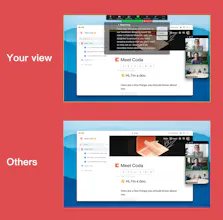
This sounds interesting, @yansoul! How do you plan to ensure the invisible feature works seamlessly while multitasking? Any plans for integrations with popular video conferencing tools?
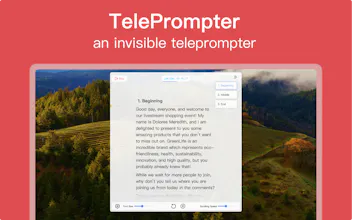
@williamjosephparker Thank you for being interested! Our teleprompter is transparent and can also be pinned at the top, so it won't interfere with other work as much as you multitask. Your idea for a video conferencing tool is great, and we're looking forward to your feedback with this direction in mind in our subsequent updates
@ema_elisi Thank you for your insightful perspective! We’ve indeed encountered some users who have expressed the need to edit scripts in real-time during sessions. In our upcoming versions, we’re planning to support script editing during the prompting process. We’re excited to hear your thoughts and feedback as we continue to improve FlowPrompter!




FlowPrompter
Resubscribe
FlowPrompter
FlowPrompter
FlowPrompter
FlowPrompter
FlowPrompter
Telebugs
FlowPrompter
FlowPrompter
Elisi : AI-powered Goal Management App
FlowPrompter