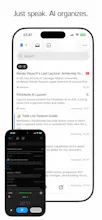
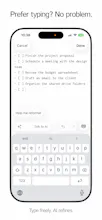
Voice notes shouldn't live in isolation — they should trigger action. No extra hardware, just your phone. Speak, and AI handles the rest: identifies tasks, syncs to Notion, distributes everywhere. We're not selling gadgets. We're building the command center for your thoughts.
Hey Product Hunt! 👋
I built FlickNote because I was tired of two things:
1. Voice memos that go nowhere (scrolling through "New Recording 47" anyone?)
2. Being sold $200 AI gadgets that do what my phone already does perfectly
Here's the truth: you don't need another device. Your phone is the best recording hardware you'll ever own. What's missing is the software to make those recordings actually useful.
FlickNote is that software. Speak into your phone, and your words become actions:
- Tasks distributed to Notion
- Notes created from Telegram messages
- Timestamps to jump back to key moments
- Full prompt control because you know your workflow best
We're not selling hardware. We're building a proper software ecosystem that plugs into tools you already use.
The bet: pure software with deep integrations beats proprietary hardware every time.
Try it and let me know what you think. What integrations should we build next?
Report
@sifang_feng Love this take, especially the “your phone is already the best hardware” angle. It’s true: most people don’t need another $200 recorder collecting dust, they need something that actually turns their voice notes into meaningful actions.
The Notion + Telegram + timestamp workflow feels like the sweet spot for people who capture fast but want structure later.
Curious what you’re thinking next on integrations, I can see Slack, Email drafts, or even task routing to tools like Todoist being huge for people who live in voice notes.
@fernando_scharnick Great timing! Slack, Email drafts, Todoist, Reminders, and Linear are all on our near-term roadmap. Email support is shipping in the next release.
For task-related apps, we're building an abstraction layer for routing tasks to different tools. The idea: AI detects tasks during meetings—deadlines, priority levels, assignees—and stages them in a middleware. This gives you a chance to review and edit AI-generated tasks before they get distributed, rather than pushing directly to your task manager. Once you're happy with the content and have configured your preferred extension (Todoist, Linear, Reminders, etc.), tasks get dispatched.
Report
@sifang_feng That sounds perfect, the middleware step is a smart move. Having AI surface the tasks but letting me review before they hit Todoist or Linear is exactly the balance I’d want. Excited to see the email update roll out!
"But the range!" — Our processing gets you ~5m effective pickup on iPhone. iPad and Mac? Even better. Meanwhile, physics doesn't care how sleek your gadget looks—a wafer-thin card simply cannot capture good audio. That's not opinion, that's acoustics.
"But my storage!" — We compress in real-time. One hour = ~8MB. Plus permanent cloud backup. Your phone will survive.
"But battery life!" — So you want to carry another charger for your fancy AI recorder? Really? Our app is built native Swift, performance is our obsession. Background recording drain is negligible—we're talking "you won't even notice" levels.
Save your money. The best recorder is the one already in your pocket, already charged, already with you.
Talk → AI organizes → Deliver to your workflow. That simple.
We're building a voice AI ecosystem that fits into YOUR existing tools, not replacing them. Already integrated with Discord, Telegram, Notion, and Shortcuts — more coming soon.
Join our Discord to follow development progress and share your feedback — we reply to every comment: https://discord.gg/VtfJFdXCvg
Thank you!
Report
It looks cool, but I'm not sure if people will use it. Have you conducted a custdev? Maybe it's worth asking if people have paid for similar solutions before?
Report
While there have been tools for recording audio and transcribing it before, none have existed to sync this functionality directly to Notion—which I found particularly interesting.
The only limitation is that it currently works only on iPhone and iPad. What's especially frustrating is that I'd particularly like it to support Apple Watch.
There are far more situations where I'd prefer typing on Apple Watch than using my iPhone.
Report
The Notion integration removes friction from content ideation for creators. Voice capture during inspiration moments → auto-organized in workspace is exactly what influencers need when ideas hit during shoots or brand calls. Discord sync is smart for creator teams coordinating campaigns.




FlickNote - AI Voice Assistant
@sifang_feng Love this take, especially the “your phone is already the best hardware” angle. It’s true: most people don’t need another $200 recorder collecting dust, they need something that actually turns their voice notes into meaningful actions.
The Notion + Telegram + timestamp workflow feels like the sweet spot for people who capture fast but want structure later.
Curious what you’re thinking next on integrations, I can see Slack, Email drafts, or even task routing to tools like Todoist being huge for people who live in voice notes.
FlickNote - AI Voice Assistant
@fernando_scharnick
Great timing! Slack, Email drafts, Todoist, Reminders, and Linear are all on our near-term roadmap. Email support is shipping in the next release.
For task-related apps, we're building an abstraction layer for routing tasks to different tools. The idea: AI detects tasks during meetings—deadlines, priority levels, assignees—and stages them in a middleware. This gives you a chance to review and edit AI-generated tasks before they get distributed, rather than pushing directly to your task manager. Once you're happy with the content and have configured your preferred extension (Todoist, Linear, Reminders, etc.), tasks get dispatched.
@sifang_feng That sounds perfect, the middleware step is a smart move. Having AI surface the tasks but letting me review before they hit Todoist or Linear is exactly the balance I’d want.
Excited to see the email update roll out!
FlickNote - AI Voice Assistant
"But the range!" — Our processing gets you ~5m effective pickup on iPhone. iPad and Mac? Even better. Meanwhile, physics doesn't care how sleek your gadget looks—a wafer-thin card simply cannot capture good audio. That's not opinion, that's acoustics.
"But my storage!" — We compress in real-time. One hour = ~8MB. Plus permanent cloud backup. Your phone will survive.
"But battery life!" — So you want to carry another charger for your fancy AI recorder? Really? Our app is built native Swift, performance is our obsession. Background recording drain is negligible—we're talking "you won't even notice" levels.
Save your money. The best recorder is the one already in your pocket, already charged, already with you.
Swytchcode
Great job! Questions
How does the app handle searches for the notes?
Can it translate the generated transcriptions?
FlickNote - AI Voice Assistant
@chilarai When online, we use an additional search engine; in offline mode, we use SQLite’s full-text search.
Swytchcode
@sifang_feng awesome!
FlickNote - AI Voice Assistant
We are supporting the feature to translate transcripts, after all, this is very simple.
FlickNote - AI Voice Assistant
🎉 FlickNote is live on iPad & iOS!
Talk → AI organizes → Deliver to your workflow. That simple.
We're building a voice AI ecosystem that fits into YOUR existing tools, not replacing them. Already integrated with Discord, Telegram, Notion, and Shortcuts — more coming soon.
Perfect for:
🎙️ Voice note lovers
📅 Meeting-heavy professionals
📚 Students
Still early days — join our Discord to shape what's next: https://discord.gg/VtfJFdXCvg
Would love your feedback! 🚀
FlickNote - AI Voice Assistant
Thank you for your support on Product Hunt!
We're still in early development, so updates will be frequent. Join our TestFlight beta to get the latest features first: https://testflight.apple.com/join/EnDyrg4h
Join our Discord to follow development progress and share your feedback — we reply to every comment: https://discord.gg/VtfJFdXCvg
Thank you!
It looks cool, but I'm not sure if people will use it. Have you conducted a custdev? Maybe it's worth asking if people have paid for similar solutions before?
While there have been tools for recording audio and transcribing it before, none have existed to sync this functionality directly to Notion—which I found particularly interesting.
The only limitation is that it currently works only on iPhone and iPad. What's especially frustrating is that I'd particularly like it to support Apple Watch.
There are far more situations where I'd prefer typing on Apple Watch than using my iPhone.
The Notion integration removes friction from content ideation for creators. Voice capture during inspiration moments → auto-organized in workspace is exactly what influencers need when ideas hit during shoots or brand calls. Discord sync is smart for creator teams coordinating campaigns.