File Widgets

File Widgets

The File Widgets we know from iOS. Now on macOS.

8 followers

Unlock the full potential of your Mac’s desktop with File Widgets, the ultimate tool for enhancing productivity and organization. With File Widgets, you have the power to bring your most important content right to your desktop.
File Widgets gallery image
Payment Required
Launch tags:MacMenu Bar AppsApple
Launch Team / Built With
Wispr Flow: Dictation That Works Everywhere
Stop typing. Start speaking. 4x faster.
Promoted

What do you think? …

Christian Sigritz
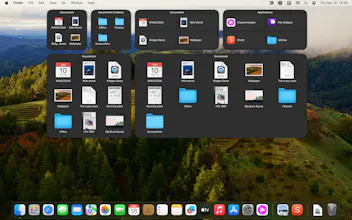
Hey community, i am Christian Sigritz, Developer of the app "File Widgets". I made "File Widgets" because i loved the Files Widget on iOS and iPadOS, but it just was missing on macOS. Here's a short list of the features of the app: Seamless Integration: Effortlessly select any folder on your Mac and transform it into an interactive widget on your desktop. Whether it’s your project files, music collection, or photo albums, File Widgets brings them to life at your fingertips. Interactive Widgets: Every file and subfolder within your chosen widgets is not just visible but fully interactive. A simple click opens any item directly from the widget, streamlining your workflow and making multitasking a breeze. Sort Order Selection: Tailor your widgets to display files and folders in an order that makes sense to you. Choose to sort items by date accessed, date added to the folder, date created, date modified, or even alphabetically, ensuring you always find what you need when you need it. Efficient Organization: Keep your desktop clutter-free and organized. File Widgets provides a neat, efficient way to access your files without the need to navigate through Finder. It’s all about having the right content at the right time. Easy Setup: With an intuitive interface, setting up File Widgets is quick and hassle-free. Simply select the folders you wish to display, choose your sort order, and watch your desktop transform. So. That's all. Thank you for stopping by.