Launched this week

Faylee
Bug reports your coding agent can fix from one link
98 followers
Bug reports your coding agent can fix from one link
98 followers
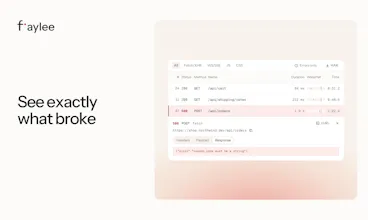
Faylee records the screen, console, every network request and each click behind a bug, on one timeline, and shares it all as one link. Your team opens it and sees exactly what broke, with the failing request already open. Paste the link into Claude Code, Codex or Cursor, and Faylee's MCP server gives the agent the whole report so it can find the cause and fix it. Instant replay saves the last few minutes after a bug already happened. Free for up to 3 members.



Free Options
Launch Team

AWS Startup AdvisorPersonalized AWS guidance that meets you where you’re already building
Promoted
Hi Product Hunt, I'm Uros, and I built Faylee.
I made it because I was tired of getting bug reports like "it doesn't work". Then I'd go back and forth with whoever reported it and wait, sometimes for a day, for more details. A product person or a customer usually doesn't know how to open the dev tools and check the console or network tab, so even when they answered I often still didn't have what I needed.
And once I finally had the details, I had to explain them all over again to Claude Code, Cursor or Codex: copy the console error, paste the failing response, describe the steps, and hope I hadn't left anything out.
With Faylee, whoever finds the bug doesn't write anything up or need to know what to include. Two clicks to start recording, or one shortcut to save the last few minutes after the bug already happened, and Faylee captures the screen, their voice, the console, the network requests and the steps. You get one link. Sensitive data is hidden before anything is uploaded.
It's for teams building web apps whose bugs come from QA, product people or customers, and for developers who fix those bugs with a coding agent.
Connect the Faylee MCP server to your coding agent, like Claude Code, Cursor or Codex, paste the link and say "fix it and comment on the report". The agent looks at screenshots of any moment, lines up what the person said and clicked with the console and network at that moment, fixes the bug and leaves a comment on the report.
Here's a real report you can open, no signup needed: https://app.faylee.app/s/x0q3Ha0QOS?theme=light
It's free for up to 3 members, no card needed. How does your team report bugs today, and what's the most annoying part? I'll be here all day answering questions.
The one-timeline part is what I'd want to test first — having the screen, console, network requests, and clicks in the same place, with the failing request already open, sounds like it removes the usual back-and-forth. Does the MCP link carry the whole timeline into Claude Code, or does the agent still need to re-ask for pieces of it?
@jcbuilds Thanks JC!
When the agent opens the link, it gets a summary right away, what the person was doing, the key moments, console errors and the failed requests. Then it pulls whatever else it needs on its own through the MCP, like the full response body, the console around a click, or what the screen looked like at that second.
You don't have to paste or explain anything, it just looks things up as it goes. We don't push the whole recording in at once because long recordings would fill up the agent's context.
Having the failed response next to the click that caused it is the detail I'd look at first. It gives the coding agent a specific request to investigate.
Exactly @oleksii_sekundant . Seeing what someone clicked alongside the failed request saves a lot of back and forth. The coding agent can use that context through MCP to investigate without you having to dig through DevTools and copy everything over.