
Evask it
Extract events & tasks with AI. Sync to your fav apps.
7 followers
Extract events & tasks with AI. Sync to your fav apps.
7 followers
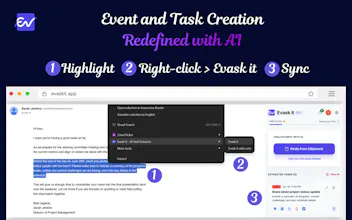
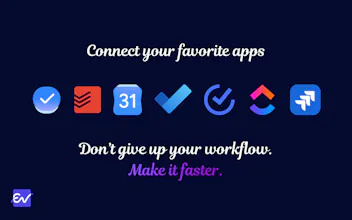
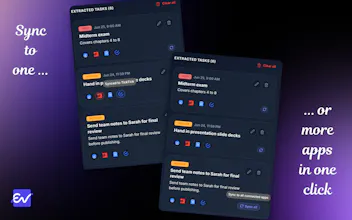
Evask it is an AI-powered extension that instantly turns unstructured text from emails, chats, or any web page into structured tasks and calendar events. Seamlessly sync your extracted events & tasks directly into the tools you already use, including Google Tasks/Calendar, Todoist, TickTick, and many more. Stop manually copying and pasting. Simply highlight any text, right-click, and our AI extracts the task title, deadlines, and priority. Take back your time and supercharge your workflow!

Free Options
Launch Team / Built With


Render: Get up to $100K in startup creditsCloud infrastructure for founders who want to move fast and NOT break things
Promoted
How does the AI handle ambiguous deadlines like "next week" or "soon" - does it assume a default or ask you to confirm before syncing to your calendar?
@hsanypvk Great question! Currently, it uses relative date-parsing. If you say 'next week,' the AI calculates a standard default (typically 7 days from today). Words like morning, afternoon, and evening have preset defaults which the users should soon be able to define themselves. More ambiguous terms like 'soon' is treated as an open-ended task with no strict deadline so it doesn't clutter your specific calendar days. However, you’ll always get a chance to review, edit, or confirm the extracted tasks and dates in the extension before anything actually syncs to your app.
Curious how the extension actually pulls deadlines from a random paragraph without a clear date mentioned, does it just guess based on context or only work when something like "by Friday" is written out?
@kumsalokkf If a paragraph is vague and no date can be inferred, the extracted task will then be treated as an open-ended task with no strict deadline. Plus, you always get to review everything before it actually hits your task management app/calendar!
Highlighted a messy Slack thread and it pulled out three tasks with the right deadlines, no editing needed. Syncing to Google Calendar was painless too, definitely saving me on busy mornings.
@minerzpy Awesome to hear! Helping you cut through the Slack noise without needing to edit is exactly why we built this. Thanks for your support!
Highlighted a messy thread from my inbox and it pulled out three tasks with deadlines straight into Google Calendar without me lifting a finger beyond the right-click. Honestly didn't expect it to handle the fuzzy dates that well.
@elmasjyoo Glad to hear it's working well for you!
The right-click highlight flow feels really thoughtful, exactly the kind of small UX choice that makes AI tools feel like they belong in your workflow instead of fighting it.
@esebcier91921 Thank you! This is exactly it; the aim is to eliminate friction and keep you in your zone. Glad it feels natural to you!