Launching today

Ecofonts
Print any PDF with up to 20% less ink, 100% in-browser
4 followers
Print any PDF with up to 20% less ink, 100% in-browser
4 followers
Ecofonts punches microscopic holes into every font inside your PDF β invisible to your eyes, obvious to your printer. Same layout, same look, text still selectable, up to 20% less ink. Nothing is uploaded; it all runs on your machine.
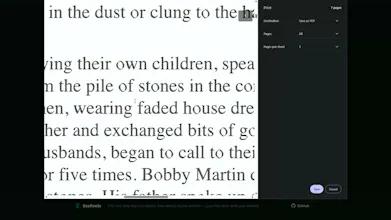

Would love to see a way to preview the savings before committing, like a small pop-up showing the estimated ink percentage and cost reduction per page. Also helpful if you could set a custom threshold for how aggressively the holes get punched.
@meltemdurkcnrwΒ Thanks! The Eco Intensity slider (1β20%) already does exactly that β and it's measured, not estimated: the % you pick is the actual glyph area removed. Fonts show a live before/after preview too; PDFs don't yet, and a per-page cost estimate is a great call. Both on the list.
Would love to see a preview mode that shows roughly where the holes are landing on the page before committing, just a faint overlay so you can adjust density if a logo or fine print gets chewed up.
@nevintpg4Β There's already something close to this that's easy to miss. Each PDF result has a Print button next to the download one. It opens the print dialog with the optimized file loaded, so you can look at the whole page before saving anything. If it looks too aggressive, close it, drop the slider and run it again. Running it twice is no trouble, it's free and it goes fast.
As for text getting chewed up, that can't really happen. The holes only get punched inside the shape, and there's a minimum wall thickness so they never reach the edge. If a letter is too thin to fit a hole inside that margin, it just gets skipped. The outlines stay exactly as drawn, whatever intensity you pick.
Seeing it before running is still better than after though. Noted.