Launching today

EBI Space
Tagline: Keep time visible while you scroll or play
2 followers
Tagline: Keep time visible while you scroll or play
2 followers
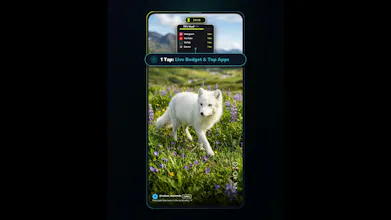
A live floating timer over your social feeds and mobile games, one shared daily budget across all your apps, colors that fade to gray as your limit nears, and a neon pulse every 10 minutes. Awareness instead of lockouts. Android, no account needed.


Free
Launch Team

CloudflareStill paying to deploy your apps? Try Cloudflare Workers for free
Promoted
Hey Product Hunt! 👋 I'm Ebrahim, the maker of EBI Space (Android only).
Social feeds and mobile games kept eating my time, and the worst part was that I never felt it go.
I tried a lot of screen-time apps. Two things kept failing me:
1. Setup. Per-app limits meant constant re-tuning: a work day, a weekend, a late night all need different numbers, so I had to reconfigure again and again.
2. Blocks and end-of-day stats. Blocks didn't actually stop me (I just skipped them), and stats showed up after the time was already gone.
My realization: time disappears while you're inside the feed. So I built something that works at that exact moment, with no lockouts and no guilt.
What EBI Space does:
⏱️ Live floating timer over your feeds and games. Tap it to see which app is eating the most time today.
🎯 One shared daily budget for all the apps and games you pick. Hopping from Reels to TikTok doesn't reset anything, and you can change the budget with one tap (shorter on a work day, longer on the weekend).
🌑 Gradual grayscale (Neuro-Dull™): colors fade as you approach your limit, so the feed gets less stimulating without interrupting it. You choose when it starts (40%, 60%, or 80%).
⚡ Every 10 minutes of continuous use, a neon edge pulse and a haptic tick give you a quick reality check.
How it's different: it doesn't lock you out, it doesn't wait for the end of the day, and you set one budget instead of one per app.
Pricing, upfront: 14 days of full PRO free. After that, PRO is $4.99/month or $29.94/year, or you can stay on a free tier that keeps your most-used app under a 30-minute budget.
Privacy: no account, and your usage data stays on your device. The Accessibility permission is used only to detect which app is in the foreground, never to read your screen. Anonymous diagnostics are optional and can be turned off in Settings.
One honest limitation: it tracks time per app, not per section, so time in Instagram DMs counts the same as time in Reels.
I'd love your help with two questions:
1. Which app pulls you in the most, and would a gradual fade to gray actually make you put it down?
2. Would a short, skippable pause when you hit your limit be better than the fade, or would you want both?
And if you'd test it for two weeks and tell me honestly whether your daily usage changed, I'd be very grateful.
Google Play: https://play.google.com/store/apps/details?id=com.ebispace.app