As an indie developer, I fully understand the hassle of maintaining multi-language support for apps. For instance, editing a single term means hunting through dozens of files just to make a change. When it comes to managing multilingual descriptions for app stores, there is also no proper tool to streamline management and automated translation. That’s why I built this software.
No reviews yetBe the first to leave a review for Easy I18n
Maker
📌
Multilingual localization is an indispensable part of global app development and operation, yet it has long been a time-consuming and tedious chore for teams worldwide. For developers, modifying a single translation entry means repeatedly locating and editing content across scattered multi-language files, which is inefficient and prone to missing or inconsistent updates. For operation teams, maintaining multilingual app store listings, release notes, promotional copy and other localized content lacks a unified management system, forcing staff to juggle multiple files and leading to messy version control and heavy manual workload.
If you’re tired of fragmented multilingual file management, repetitive manual editing, and unmanageable localized content throughout development and operation, Easy I18n is your all-in-one solution to streamline the entire localization workflow.
Core Features:
1. Cross-Platform Compatibility
Fully supports mainstream desktop operating systems, includingMacOS, Windows and Linux (Ubuntu), enabling consistent usage experience for developers and operators with different device environments.
2. Multi-Project & Multi-Format Full Coverage
The tool supports creating and managing multiple independent multilingual projects simultaneously. It is compatible with almost all mainstream development and localization file formats, covering Android, iOS, Flutter, Kotlin Multiplatform, Java Properties, custom YAML and JSON files. Each file format allows configuration of multiple storage paths, adapting to complex project directory structures.
3. Intuitive & Efficient Editing Experience
After configuring the project path, the tool can automatically scan and load all multilingual entries, presenting data in a clear table layout with one entry per row. Users can click any entry to open a unified edit dialog, modifying all language translations of the target term in one window — no need to switch or edit multiple files separately.
4. Powerful Filter, Sort & Search Capabilities
Built with practical data management functions including keyword full-text search, multi-language dimensional filtering, and custom sorting. It supports quick positioning of target entries and visual data sorting, making it easy to manage thousands of multilingual terms efficiently.
5. Smart Automated Translation
Integrates multiple mainstream official translation APIs and AI translation capabilities, supporting one-click automatic batch translation for entries out of the box. To improve translation accuracy, the tool allows adding custom notes and descriptions for projects and individual entries, which can be referenced by AI translation engines to generate more standardized and context-compliant translation results.
6. Visual Translation Data Statistics
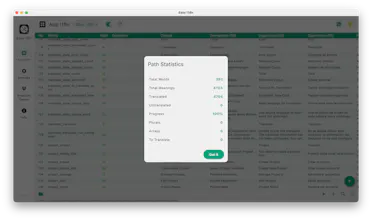
Provides real-time visual translation progress statistics, clearly displaying key data such as entry translation completion rate and untranslated terms. It helps teams intuitively grasp the overall localization progress and arrange follow-up optimization work.
it's nice good job @wyuhuan , I really like it
Is intlayer.org was an inspiration for you? All features listed seems to be quite similar, including the self hosting part.
Great job again