DuoBar is a small macOS menu bar app inspired by the iPhone Duo status bar icon. It puts things like battery, Wi-Fi, network activity, CPU, memory and disk into one compact icon instead of having a separate icon for everything. You can also choose what you want to see and how it's arranged. :)
When Apple showed the iPhone Duo, the part that stuck with me wasn't the phone, it was that little status indicator that squeezes battery, Wi-Fi and signal into one thing. My Mac menu bar already has way too many icons on it, so I wanted that on my Mac. Except I didn't want Apple's layout, I wanted to pick what shows where.
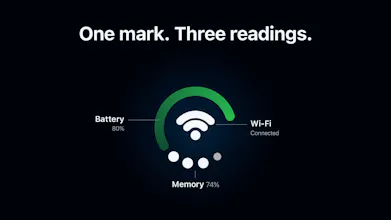
So I built DuoBar. It's a single icon with an outer ring, a glyph in the middle and four small dots around it, and you decide what each one shows: battery, Wi-Fi, CPU, memory, disk, network activity. I've got a few more I'm working on.
The free version has battery, Wi-Fi and memory. Pro gets you everything else and lets you customize the whole thing.
It's the first version so there's probably rough stuff I haven't caught yet. If you try it and something's missing or annoying, leave a comment. I'm reading all of them and a lot of the next update will come from here.




Hey everyone,
When Apple showed the iPhone Duo, the part that stuck with me wasn't the phone, it was that little status indicator that squeezes battery, Wi-Fi and signal into one thing. My Mac menu bar already has way too many icons on it, so I wanted that on my Mac. Except I didn't want Apple's layout, I wanted to pick what shows where.
So I built DuoBar. It's a single icon with an outer ring, a glyph in the middle and four small dots around it, and you decide what each one shows: battery, Wi-Fi, CPU, memory, disk, network activity. I've got a few more I'm working on.
The free version has battery, Wi-Fi and memory. Pro gets you everything else and lets you customize the whole thing.
It's the first version so there's probably rough stuff I haven't caught yet. If you try it and something's missing or annoying, leave a comment. I'm reading all of them and a lot of the next update will come from here.
Thanks for checking it out!
Cheers!!
Teekam