
Launched this week
Droppy
Notch Shelf, Floating Basket & Clipboard Manager for macOS
78 followers
Notch Shelf, Floating Basket & Clipboard Manager for macOS
78 followers
Droppy combines 5 essential productivity tools into one macOS app: 🗂️ Notch Shelf - Files snap into your MacBook's notch 🧺 Floating Basket - Summon with a mouse jiggle 📋 Clipboard Manager - History with OCR 🎵 Media Player - Now Playing in your notch 🔊 Custom HUDs - Volume/brightness overlays Free & Open Source forever.


HtmlDrag
Finally, a clipboard manager that doesn't feel cluttered. The 'Notch Shelf' concept is a very clever use of screen real estate. Is there a shortcut to toggle the shelf visibility, or does it only appear when dragging a file?
Hey everyone! Just released Droppy 4.7 with some major updates:
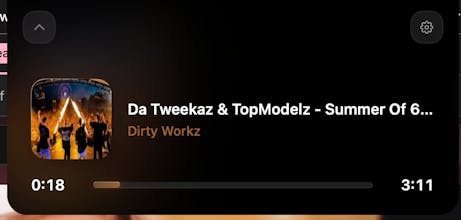
🎵 Media Player Completely revamped the Now Playing HUD - smoother animations, better layout, new seek slider that matches the system HUD style.
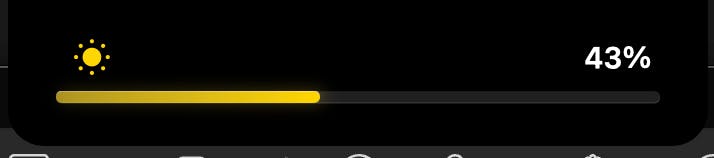
🔊 Volume & Brightness HUD Redesigned system HUDs with new slider aesthetics - they thicken with a subtle glow when you're adjusting values.
⌨️ New Shortcuts
Cmd+A to select all items in Shelf or Basket
Shift+Click range selection in Clipboard Manager
🔧 Quality of Life
Fixed transparency mode bugs in Settings
"To Shelf" buttons now hidden when Notch Shelf is disabled
Performance improvements for shelf animations
Install via Homebrew:
Or grab the DMG from GitHub
Free & open source as always!
Congrats on the launch and thanks for sharing!
@kostgx Thanks for your comment! I'm currently building more/better features and polishing. Excited to build Droppy!
🎉 Droppy 4.8 is here! Massive update with Battery HUD, Native Updater, RAM/CPU optimizations & more!
Hi again! It's been an incredible sprint of updates since 4.6 and I wanted to share everything that's new. This is probably the biggest quality-of-life update yet!
⚡ NEW: Battery Charging HUD
When you plug in or unplug your charger, Droppy now shows a beautiful battery indicator right in the notch!
Green pulsing glow when charging
Orange warning for low battery
Seamlessly integrates with the existing volume/brightness HUDs
(Battery HUD follows the same design as volume/brightness)
🎨 Native DroppyUpdater
No more ugly Terminal windows! Updates now show in a beautiful native macOS window:
Animated progress with checkmarks for each step
Confetti celebration when update completes 🎊
Green "Launch Droppy" button when ready
Falls back gracefully if anything goes wrong
🚀 Massive Performance Improvements
RAM Usage (Down 80%+!)
Images now stored on disk instead of in memory
Lazy loading - only loads what you see
Thumbnail caching with LRU eviction
Went from 2.9GB with large clipboard to ~400MB
CPU Usage
Removed expensive hover animations that caused layout recalculations
Async thumbnail loading prevents main thread blocking
Optimized scrolling in clipboard manager
Canvas-based confetti (60fps, no lag)
🎵 Polished Media Player
The expanded media player got serious attention:
Pixel-perfect padding - Album art, timestamps, and controls now align consistently on all edges
Smooth transitions - Symmetric animations when switching between media player and drop zone
Slider interactions - Track expands and glows when dragging
🔧 Other Improvements
macOS 14 compatibility - Graceful degradation for older systems
Fixed Brightness HUD false triggers - No more random HUD popups when plugging in power
Swift 6 compatibility - Cleaned up async/await warnings
Consistent transitions - All view switches now animate the same way
🐛 Bug Fixes
Auto-update quarantine issues completely resolved
"Cleaning up" spinner no longer stays visible after update
Volume/Brightness HUD sizing issues fixed
Call HUD for FaceTime/Zoom calls improved
Download:
or grab from
GitHub Releases
Support development: Buy Me a Coffee ☕
Let me know what you think! What features would you like to see next? 🙌
BIG NEWS!
Since 4.9.3 - Droppy enables native integration with Alfred. Select files in your finder, invoke Alfred, and send them directly to Droppy with a single keystroke.
🚀 Droppy v5.2 - Major Updates!
Hey makers! We've been busy shipping some exciting updates to Droppy. Here's everything that's new since our last update:
🏝️ Dynamic Island for Mac (v5.0-5.2)
The biggest addition! Macs without a notch (iMacs, Mac minis, older MacBooks, external displays) now get an iPhone-style Dynamic Island that:
Floats elegantly below the screen edge
Shows now playing info, volume/brightness HUDs, and battery status
Can be set to transparent glass or solid black
Auto-hides when idle, reappears on hover
📧 Email Drag Support (v4.9.5)
Drag emails directly from the Apple Mail app into Droppy! Perfect for organizing email attachments alongside other files.
🧙 Onboarding Wizard (v4.9.5)
New users get a beautiful setup experience that walks through all features and permissions.
⚡ UX Improvements (v5.1)
Single-click to open the shelf (no more double-clicking)
Millimeter-perfect hover detection - won't block browser URL bars
Basket snap positions - floating basket snaps to screen edges
🎨 Visual Polish (v5.2)
Standardized HUD sizes for consistent appearance
Instant auto-hide toggle response
Refined hover zones with Fitt's Law compliance
🔐 Privacy & Accessibility
Screenshot privacy protection
Configurable accessibility indicators
Improved permission handling
Download: https://github.com/iordv/Droppy/releases/latest
Homebrew:
What feature would you like to see next? 👇