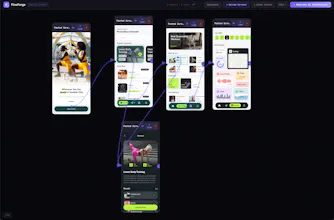
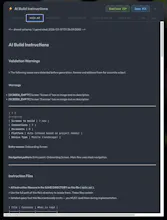
Drawd is a browser-native app flow designer for mobile developers and designers. Upload screen images, draw hotspot tap areas, connect screens with navigation arrows, and define conditional branches. Organize flows with screen groups and sticky notes. Export a structured ZIP of AI build instructions for SwiftUI, Flutter, React Native, or Jetpack Compose. No sign-up, no backend, no plugins. Saves to a localdrawd file.
No reviews yetBe the first to leave a review for Drawd
Maker
📌
I kept sketching app navigation flows on paper or in Figma, then manually describing them to an AI to generate code. It was slow and the descriptions never captured the full picture.
Drawd solves that: upload your screens, define tap areas, connect screens with conditional branches, then export structured AI build instructions directly.
The demo shows the full chain: extract screens from Figma, design the flow in Drawd, feed the ZIP to Claude Code, get a working app.
Happy to answer any questions about how it works!
Report
This is actually 🔥
Love the no sign-up, no backend, fully local approach — feels like the opposite of all the heavy tools we’re used to.
As someone working with mobile apps, the most interesting part is the flow → AI build instructions → code pipeline. If this works smoothly, it could save a ton of time on wiring navigation and basic app structure.
Report
Maker
@vincent3467 Thanks Vincent! That pipeline is exactly what I built Drawd around -- the idea that visual flows shouldn't just be documentation, they should directly feed into your build process. You design the screens, map out the navigation, and Drawd generates structured AI instructions that any coding agent can pick up and run with.
The local-first approach was intentional too -- your designs stay on your machine, no accounts or cloud dependencies. Just open and start designing.
Would love to hear how it fits into your mobile workflow if you give it a spin!



This is actually 🔥
Love the no sign-up, no backend, fully local approach — feels like the opposite of all the heavy tools we’re used to.
As someone working with mobile apps, the most interesting part is the flow → AI build instructions → code pipeline. If this works smoothly, it could save a ton of time on wiring navigation and basic app structure.
@vincent3467 Thanks Vincent! That pipeline is exactly what I built Drawd around -- the idea that visual flows shouldn't just be documentation, they should directly feed into your build process. You design the screens, map out the navigation, and Drawd generates structured AI instructions that any coding agent can pick up and run with.
The local-first approach was intentional too -- your designs stay on your machine, no accounts or cloud dependencies. Just open and start designing.
Would love to hear how it fits into your mobile workflow if you give it a spin!