
DOMCopy
Copy any element on a page as text, HTML, or Markdown
2 followers
Copy any element on a page as text, HTML, or Markdown
2 followers
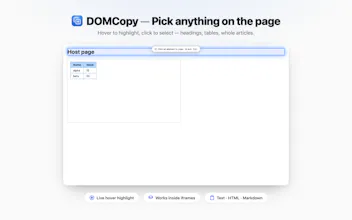
DOMCopy lets you hover-pick any element — a heading, a table, a whole article, even content inside an iframe — and copy it the way you need it. Text, HTML, Markdown(Pro) Navigate between Parent, Child, Siblings No accounts, no tracking. Your copied content never leaves your device.


Free
Launch Team

Dropbox SignSimple, secure eSignatures for the way your team works.
Promoted
👋 Hey everyone! I'm universeroc the maker of DomCopy.
I built this out of my own daily frustration. Whenever I read articles,
docs, or news, I constantly want to grab one specific piece — a
paragraph, a table, a code snippet. But the options all felt broken:
Plain text copy → structure gone
Copy as HTML → drags in styles and nav chrome
Copy → paste into a Markdown converter → manual cleanup, especially tables
So I built DomCopy: press Alt+Shift+D, hover to pick any element, and copy it as clean Text, HTML, or Markdown — without leaving the page.
A few things I'm proud of:
Arrow-key navigation up/down/across the DOM tree, so you can land on exactly the right node on even the messiest pages
It works inside cross-origin iframes — embedded editors, CodePen widgets, all grabbable
Privacy by design: no accounts, no analytics, no servers. What you copy goes to your clipboard and nowhere else.
Pricing, transparently: text/HTML/iframes/tree nav are free forever. Markdown copying is Pro ($3.99/mo or a $29.99 lifetime deal).
I'd love your feedback — especially on the picker UX. If something feels off on a heavily nested page, or you hit an edge case (I know there are plenty 😅), tell me in the comments and I'll fix it fast.
Thanks for checking it out! 🙏