
Digital Napkin
Visual sticky note board for your Chrome side panel
2 followers
Visual sticky note board for your Chrome side panel
2 followers
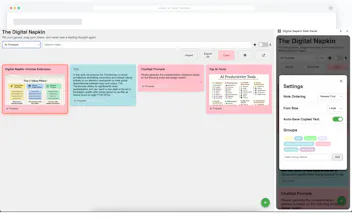
Most note extensions are just messy lists. Digital Napkin transforms your Chrome side panel into a visual, drag-and-drop workspace. Designed for deep research, it features an optional 'Auto-Save' clipboard that captures snippets in the background while you browse. Key Highlights: 🔒 100% Local Storage (No accounts or tracking) 🎨 Drag-and-drop organization with 10 pastel colors 🖼️ Image support & Dark Mode ✨ Minimalist UI: Controls appear only on hover




Hey everyone,
I wanted to share a small side project I’ve been working on. I constantly found myself needing a quick place to jot down ideas, save text snippets, or organize thoughts while deep in research, but I hated having to switch tabs or open a heavy note-taking app.
So, I built Digital Napkin Side Panel. It essentially turns your browser's side panel into a visual, drag-and-drop sticky note workspace.
I'm really just starting this journey and trying to get my first real wave of feedback.
Here is what it does:
- Smart Clipboard: It has an optional "Auto-Save" feature that automatically turns anything you copy on the web into a note in the background.
- Visual Organization: You can drag and drop notes to reorder them, color-code them with 10 different pastel colors, and create custom groups (like "To-Do" or "Ideas") with a smart filter dropdown.
- Privacy-First: This was a big priority for me. Everything is stored 100% locally in your browser using Chrome's storage API. There are no accounts required, no cloud syncing, and absolutely zero tracking.
- Media & Theming: It supports pasting images directly into notes and has a built-in dark mode.
What I've learned so far: Building the core extension was fun, but making the UI feel clean was a challenge. In this latest version, I hid all the action buttons (delete, pin, copy) until you hover over a note to remove visual clutter, and made the grid intelligently adapt to a full-screen view if you open it in a new tab.
I'm hoping to eventually apply for the 'Featured' badge, but right now, I just want to make sure the core experience is solid.
I’d love to know: What is the one feature you wish your current note-taking app had in the side panel?
Chrome Web Store link: https://chromewebstore.google.co...