Tutorials cannot see what you are doing. DeskProf can. Learn Python, Blender 3D, Claude Code, Calculus, DaVinci Resolve, Canva, vibe coding, and more with an AI tutor that joins you through live voice and screen sharing. No typing. Just talk while it watches your actual work, guides you step by step, and gets you unstuck the moment you need help. Every session picks up right where you left off. Learn by doing, not just watching. Try DeskProf free. No credit card required.
Hey Product Hunt! 👋 I’m Malitha, the founder of DeskProf.
> The Problem I built DeskProf to solve a frustrating loop I kept getting stuck in while learning new skills:
Watch a tutorial → Follow along → Get stuck → Take a screenshot → Explain the context to an AI → Repeat
It works, but it completely breaks your flow every time. The natural alternative is a human tutor, but private 1:1 sessions are expensive. For example, they often cost $40 to $80/hour in the US. On top of that, you usually have to schedule them in advance, so help isn’t there at the exact moment you’re stuck.
> The Solution So I asked: what if an AI tutor could actually watch your screen? DeskProf is an AI tutor that sees your screen, listens to you talk, and guides you step-by-step in real time.
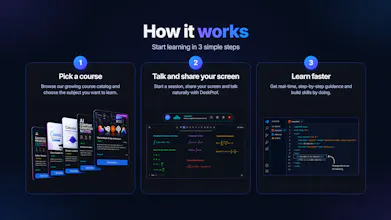
> How It Works 1. Pick a course
Choose a structured learning path or subject from the catalog to launch your session.
2. Talk and share your screen
Speak naturally with zero typing required while DeskProf observes your workspace.
3. Learn interactively
It teaches you everything step-by-step and tells you exactly what to do next using visual cues like pointing directly at screen elements, highlighting tools, and drawing on a whiteboard. If you ever get stuck, just use the Circle to Search feature for an instant explanation.
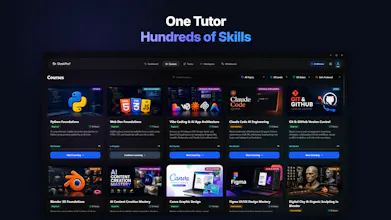
> What Makes It Different You’re not just getting random troubleshooting. You follow a structured course path while getting real-time, screen-aware assistance the moment you get stuck. I’m starting with practical skills like Python, Blender, Photoshop, Excel, Canva, Claude Code, and more.
> The Goal The goal is simple: make learning feel less like pausing your workflow to hunt for answers, and more like having an expert sitting right next to you.
> I'd love your feedback! Thank you for checking us out, and I would genuinely love your feedback. What tool or skill would you want to learn with a screen-aware tutor? 🚀
Report
No reviews yetBe the first to leave a review for DeskProf





Hey Product Hunt! 👋
I’m Malitha, the founder of DeskProf.
> The Problem
I built DeskProf to solve a frustrating loop I kept getting stuck in while learning new skills:
Watch a tutorial → Follow along → Get stuck → Take a screenshot → Explain the context to an AI → Repeat
It works, but it completely breaks your flow every time. The natural alternative is a human tutor, but private 1:1 sessions are expensive. For example, they often cost $40 to $80/hour in the US. On top of that, you usually have to schedule them in advance, so help isn’t there at the exact moment you’re stuck.
> The Solution
So I asked: what if an AI tutor could actually watch your screen?
DeskProf is an AI tutor that sees your screen, listens to you talk, and guides you step-by-step in real time.
> How It Works
1. Pick a course
Choose a structured learning path or subject from the catalog to launch your session.
2. Talk and share your screen
Speak naturally with zero typing required while DeskProf observes your workspace.
3. Learn interactively
It teaches you everything step-by-step and tells you exactly what to do next using visual cues like pointing directly at screen elements, highlighting tools, and drawing on a whiteboard. If you ever get stuck, just use the Circle to Search feature for an instant explanation.
> What Makes It Different
You’re not just getting random troubleshooting. You follow a structured course path while getting real-time, screen-aware assistance the moment you get stuck.
I’m starting with practical skills like Python, Blender, Photoshop, Excel, Canva, Claude Code, and more.
> The Goal
The goal is simple: make learning feel less like pausing your workflow to hunt for answers, and more like having an expert sitting right next to you.
> I'd love your feedback!
Thank you for checking us out, and I would genuinely love your feedback. What tool or skill would you want to learn with a screen-aware tutor? 🚀