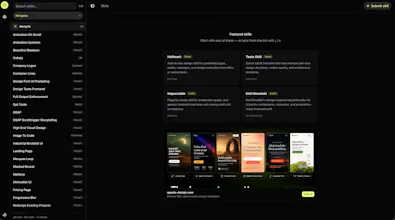
Design Skills Directory — browse design skills for AI coding agents with live HTML demos (not just READMEs), then install in one command. Search by topic, preview before/after & interactive demos, copy `npx skills add …` for Cursor, Claude Code, Codex & more. Free. Built for vibe coders tired of AI UI slop.
Hey Product Hunt 👋
We built Design Skills Directory because agent skills for design were hard to evaluate. You’d find a GitHub SKILL.md, install it, and hope.
So we made a directory where every skill can show a live demo (or before/after) before you install. Same install path as the open skills ecosystem: npx skills add owner/repo --skill name.
It’s free. Feedback we want most:
Which skill demos feel most useful?
What’s missing from the catalog?
Anything broken on mobile?
Submit a skill from the UI if you maintain one — or roast the demos in the comments. We’re listening.
Report
Love having the live demos instead of hunting through READMEs. One thing that would help me a lot: let me save favorites or build a shortlist of skills I want to try, and let me export that list as a single npx command so I can install a curated set in one go.
Report
Honestly the live demos are a game changer, finally I can see what a skill actually does before installing it. Searched for a few card components and the before/after previews saved me from picking the ugly ones.
Report
honestly the live demos are what sold me, super helpful to actually see stuff before installing. one thing though, it would be clutch if you could favorite or save skills to a personal list, kind of like a bookmarks folder, since browsing by topic is great but i keep losing track of the ones i want to try later.
Report
the live demos are a really nice touch, way better than guessing from a readme. installed a couple skills for cursor in under a minute, clean and painless.
Report
The live demos instead of static READMEs is such a smart move, you can actually see what you're getting before cluttering your workflow. Whoever pushed for that instead of taking the easy route with another list site really gets what vibe coders need.
Lugia
Love having the live demos instead of hunting through READMEs. One thing that would help me a lot: let me save favorites or build a shortlist of skills I want to try, and let me export that list as a single npx command so I can install a curated set in one go.
Honestly the live demos are a game changer, finally I can see what a skill actually does before installing it. Searched for a few card components and the before/after previews saved me from picking the ugly ones.
honestly the live demos are what sold me, super helpful to actually see stuff before installing. one thing though, it would be clutch if you could favorite or save skills to a personal list, kind of like a bookmarks folder, since browsing by topic is great but i keep losing track of the ones i want to try later.
the live demos are a really nice touch, way better than guessing from a readme. installed a couple skills for cursor in under a minute, clean and painless.
The live demos instead of static READMEs is such a smart move, you can actually see what you're getting before cluttering your workflow. Whoever pushed for that instead of taking the easy route with another list site really gets what vibe coders need.