
Dashlet
Any data. Right on your Home Screen.
19 followers
Any data. Right on your Home Screen.
19 followers
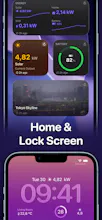
Dashlet turns any HTTPS endpoint into a widget. Connect an endpoint, tap the JSON fields you want in a live browser, pick a render type (number, chart, gauge, map), and place it as a native widget. Home Screen, Lock Screen, StandBy, Watch complication. No code, no account, no data leaving the device. Secrets sit in the Keychain, fetching happens on-device, and there are no third-party SDKs or analytics.



Hi Product Hunt, developer here!
I built Dashlet since I often found myself building different web dashboards for all sorts of data (custom page views monitoring, app downloads, info from my home sensors) and I quickly got tired of always having to navigate to a page in Safari and reenter credentials to access them.
I wanted to just simply be able to see it on my phone, when scrolling around it - in almost realtime.
I've built bespoke apps (just for myself) in the past, that mapped a specific custom API for that purpose, but it was a hassle anytime I changed something in the response or added some new API for myself.
So, Dashlet is an answer to that - it can handle any JSON (or XML, or even image) endpoints and has a nice interactive way of picking which values out of it should be displayed in which type of widget.
Here's some of the examples of how it can be used - https://docs.getdashlet.app
Hope anybody else finds it useful and can even think of ways to wire it up that I haven't thought of yet!
the on-device, no-account angle is the right call for something touching API keys. question on auth though: static API keys and headers make sense for the keychain model, but what about endpoints behind OAuth where the token itself expires and needs a refresh flow? does Dashlet handle that refresh on-device too, or is it limited to long-lived keys and personal access tokens for now?
@galdayan thanks for the comment!
Currently it only supports long-lived tokens or static custom auth headers.
OAuth and token refresh is planned for a future update - but I need to figure out a good way to do that generic enough for all sorts of cases while still secure and private.
@ziga_dolar that's the right way to think about it honestly, better to ship a solid version for static keys now than rush a generic oauth flow and get the security model wrong. long-lived PATs cover most of my own use cases anyway
Love how everything stays on-device, that alone sold me. One thing I'd kill for: a way to schedule refresh intervals or trigger updates based on location, so my crypto ticker only pings when I actually open my banking app nearby. Would cut battery drain even further and make widgets feel way more contextual.
@mnegis31293 Thanks, I am specifically trying to be very clear that no data leaves the device.
Refresh intervals are somewhat configurable (there are different refresh profiles for each data source). But, indeed, having it be based on location (defining geofences or something) could make sense. I'll add a note to the backlog about it.
The battery drain is in fact something I was trying to be very considerate of - the data is only refreshed once in a given interval (based on the refresh profile) even if there are 20 widgets using it... but that does mean that a given widget's refresh might have it show a bit of stale data.
It's an interesting balancing act - having widgets be fresh and recent vs. not draining battery. More datasources mean more refreshes. Will definitely try to optimize it further.
honestly this looks really useful, the no-account on-device thing is exactly what i want. one thing that would make it a killer feature for me is being able to chain two endpoints into a single widget, like pulling a list of crypto prices from one api and then converting them with a fx rate from another before rendering the gauge. would save me from doing the math in my head every morning
@ala83719984275 Thanks!
I definitely have it in my backlog - but that makes it a bit more complicated than mapping a single field from a single response - so the picker needs some improvement for it. Additionally, adding math and processing operations to each field.
Definitely something that should be coming in a near future update.
A widget refresh interval of 5+ minutes kills real-time use. Please add a background fetch mode with a configurable sub-minute interval (or at least let me pick 1 min on iOS 17+), or trigger refreshes on push so things like stock tickers and server dashboards actually feel live.
@serkangzelytiq you’re right - making it fully realtime is a different thing - but on iOS that’s impossible with widgets - iOS controls how often they refresh and there’s a budget of refreshes per day. Even trying to schedule them more frequently doesn’t mean they’ll actually get refreshed as fast. There already is background fetch mechanism (uses the same schedule) - but even if scheduled for every minute, iOS would throttle them and still wouldn’t work realtime.
Currently, the only way to have it “live” is to keep the app open and have an active dashboard (there’s a separate setting for the frequency of updates inside the app) - but that’s a different way of using it. Widgets on the home screen are intended as glancable somewhat fresh information (but not realtime).
Push notifications would somewhaat solve this, but - the silent ones are also throttled by the system (same as background fetch) where it’s optimized for battery/network usage etc…
I’ll definitely look into some more realtime options - but there’s not really a way to do it reliably on the home/lock/warch widgets.
The tap-to-pick JSON fields approach is genuinely clever, way less friction than wiring up a Grafana instance just to glance at a metric. Glad secrets stay in the Keychain too, that was the first thing I checked.
@elifsukbxw Thanks, I really wanted it to be visual and to not need to deal with JSON paths... and of course keeping everything private on device!
Made a quick widget for my uptime monitor and the JSON picker is honestly the smoothest part. Love that nothing leaves the device, makes it easy to trust with API keys.
@hkomurcu3158 Thanks, glad it worked smoothly for you! Let me know what kind of functionality you'd like to see to make it even better!