Custom Tab Name

Custom Tab Name

Customize browser tab titles manually or automatically.

7 followers

Customize browser tab titles manually or automatically. Custom Tab Name: Manual & Automatic Tab Title Customization Take control of your browser tabs by setting custom, descriptive titles. This essential productivity extension allows you to rename your tabs manually on the fly or automatically based on powerful, user-defined rules. Say goodbye to confusing, generic tab titles and instantly know which tab is which.
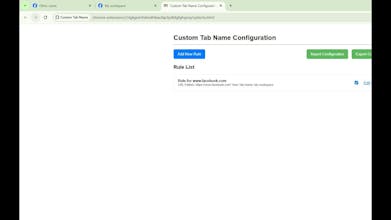
Custom Tab Name gallery image
Free
Launch tags:Chrome Extensions
Launch Team

What do you think? …

Cao Văn Thanh
Customize browser tab titles manually or automatically. Custom Tab Name: Manual & Automatic Tab Title Customization Take control of your browser tabs by setting custom, descriptive titles. This essential productivity extension allows you to rename your tabs manually on the fly or automatically based on powerful, user-defined rules. Say goodbye to confusing, generic tab titles and instantly know which tab is which. Key Features: 1/ Manual Rename: Quickly set a new, temporary title for your current tab directly from the extension Popup. Great for organizing your active workspace. 2/ Automatic Rule-Based Renaming: Configure persistent rules to automatically rename tabs when their URL matches a specific pattern (e.g., set the title of your work email to "Work Inbox" or a project management page to "Project X"). 3/ Full Rule Management (CRUD): Easily Create, Read, Update, and Delete your custom naming rules via a dedicated Options Page. Each rule includes a Rule Name, URL/Pattern matcher, and the New Tab Title. 4/ Persistent Storage: All your configuration rules are reliably saved across browser sessions using the Chrome Storage API. 5/ Configuration Backup: Use the Import and Export features to easily backup your entire set of rules to a JSON file and restore them on any machine. 6/ Global Toggle: Instantly disable or enable the entire automatic renaming functionality via the Popup for quick control.