CSV Display Shortcode

CSV Display Shortcode

"Easily turn CSV data into HTML tables with our plugin!"

1 follower

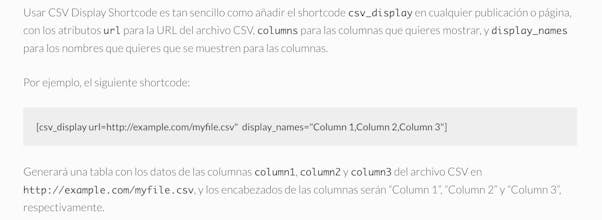
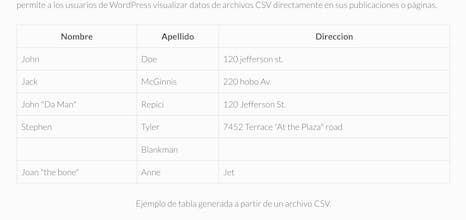
"This plugin allows users to display data from a CSV file in an HTML table using a shortcode. Users can specify the CSV file URL, the columns they wish to display, and the display names for those columns."
CSV Display Shortcode gallery image
Free
Launch tags:WordPressGitHub
Launch Team
Unblocked AI Code Review
High-signal comments based on your team's context
Promoted

What do you think? …

Mauricio “Rockerfeler” Perera
Hello Product Hunt community! We are pleased to introduce our new WordPress plugin, CSV Display Shortcode. This innovative plugin allows users to visualize CSV file data directly on their WordPress posts or pages. But that's not all, it also gives you total control over your data presentation, allowing you to select which columns to display and how to name them. It's as simple as adding the csv_display shortcode to any post or page, with the url attributes for the CSV file URL, columns for the columns you want to display, and display_names for the names you want to be displayed for the columns. If you're looking for an efficient way to visualize your CSV file data on your WordPress site, we invite you to try CSV Display Shortcode. We're sure you'll find this plugin useful for your data management needs. Enjoy visualizing your data with CSV Display Shortcode!