Launching today

Crustify
a file converter for Windows that works offline
2 followers
a file converter for Windows that works offline
2 followers
Drag a file, tap a key, pick a format. Crustify converts images, video, audio, PDFs and documents on your PC. Nothing is uploaded.


Free
Launch Team

CloudflareDeploy serverless functions globally in seconds
Promoted
Hey Product Hunt 👋 I’m Suyash, and I made Crustify.
Why I built it: whenever I needed to turn an iPhone HEIC into a JPG, shrink a video for WhatsApp or merge a few PDFs, I ended up on some random converter site. I’d upload personal files to a server I knew nothing about, sit through ads, then wait for a download link. Mac users have nice built-in tools for this; on Windows it always felt clunky.
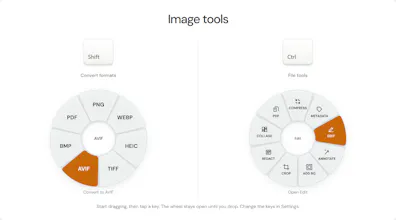
So I built Crustify. It lives in your tray and you never “open” it:
Start dragging any file (from Explorer or the desktop)
Tap Shift (convert), Ctrl (tools) or Alt (actions)
A wheel appears under your cursor. Drop the file on what you want. Done.
What’s inside:
• 248 conversions across 46 formats: images, video, audio, PDF, Office docs, ebooks, subtitles
• 23 tools: compress, trim, crop, redact, edit photos, merge and organise PDFs, and more
• 100% offline. Your files never leave your PC, and there’s no account.
• About 3 MB of memory while idle. I spent an embarrassing number of nights on that 😅
Pricing: it’s free during launch week, until 15 November. After that it’s a one-time ₹49 (under $1) for a lifetime licence on 2 PCs, with a 7-day free trial. No subscription.
Feedback that would help most:
• Which conversion or tool did you look for and not find?
• Did the drag-and-tap gesture click for you straight away, or did it feel odd at first?
• Anything that broke or felt slow on your PC?
I’ll be here all day answering questions. Thanks for checking it out 🙏