Launching today

CreatorPhoto 3.0
Organize, edit & collage photos in one Windows app
2 followers
Organize, edit & collage photos in one Windows app
2 followers
CreatorPhoto 3.0 is a major update to a practical Windows photo organizer and editor. Batch rename, resize, crop, add watermarks, convert six image formats, and create collages in a dedicated Studio with 10 layouts. Keep everyday photo work in one local workspace.




Free Options
Launch Team

Render: Get up to $100K in startup creditsThe fastest way to launch and scale your startup in the cloud
Promoted
Hi Product Hunt! 👋
I'm AdamYang, an independent Windows app developer, and I'm excited to share CreatorPhoto 3.0, the latest major update to my photo organization and collage application.
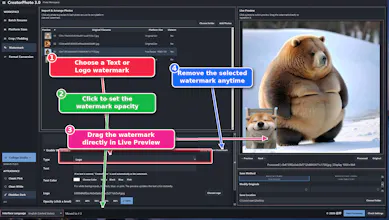
I built CreatorPhoto to make everyday photo tasks easier without jumping between several tools. Version 3.0 brings a refreshed workspace, flexible resizing and cropping, easier text and Logo watermark controls, and a dedicated Collage Studio with 10 layouts.
A typical workflow: import photos, drag them into order, preview batch filenames, choose a platform size or custom dimensions, crop or add padding, then apply watermarks and choose JPG, PNG, WebP, BMP, TIFF, or GIF output.
In Collage Studio, click to add photos, drag to position them, use a slider or mouse wheel to resize, and press Delete to remove the selected image. Choose a background image or a precise HEX color, adjust the canvas proportions and grid spacing, and save your collage.
Photo processing takes place locally on Windows. English, Traditional Chinese, and Simplified Chinese interfaces are available, with dark, light, and pink themes.
I'd love your feedback on the interface and which photo workflows you would improve next!
Microsoft Store:
https://apps.microsoft.com/detail/9p32ddcw56hh?hl=en-US&gl=US
All paid apps include a 7-day free trial. We continuously improve and upgrade one product each month.
More products on Microsoft Store:
https://apps.microsoft.com/search/publisher?name=AdamYang&hl=en-US&gl=US