
Precision time control for macOS: Floating app timers, live wallpaper clocks, custom themes. Perfect for developers, designers, educators, and creatives. Track projects, presentations, or streams effortlessly. Transform your workflow—download now!
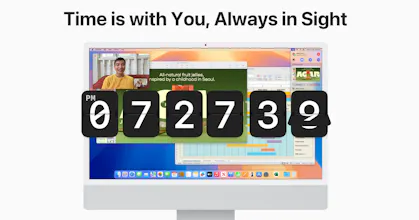


A beautifully designed flip clock and countdown timer for your desktop. Stays on top of fullscreen apps. When you're deep in code or design, you lose track of time. I used to keep a hardware clock on my desk but the designs were ugly and batteries were a hassle. With 5 monitors, a small corner of one screen does the job perfectly. I set a project deadline as a countdown pinned to my wallpaper and keep the clock floating above everything. Two widget-style windows and my entire workflow is covered. Functional and beautiful.
Alternatives Considered
Report
The live wallpaper clocks are a unique concept but do they noticeably affect system performance or battery life for MacBook users?
@nicholas_anderson0 Great question about performance! Countdown Pro is designed to be lightweight. As a completely native macOS application, it is specifically engineered for optimal performance. We’ve meticulously measured and optimized CPU usage, RAM consumption, and energy efficiency during development. The live wallpaper clocks have minimal impact on system resources, ensuring smooth operation across all Mac hardware, including Intel MacBooks and M1, M2, M3, and M4 architectures. No significant impact on battery life has been observed. We can’t wait for you to try it!
CountDown Pro is a game-changer! As a developer, I often lose track of time while coding, but this app keeps me on schedule effortlessly. The always-on-top feature is a lifesaver during presentations. Highly recommended.
Countdown Pro has become my favorite app for tracking important dates! The flip clock design is both cool and nostalgic. Creating countdowns is super easy, and you can customize colors or choose between clock and countdown themes from the menu bar, placing them anywhere on your screen. The new widgets are an absolute game-changer! I can do everything with this app that I couldn’t do with regular widgets. This way, I can effortlessly keep track of my countdowns without any hassle. It’s simple, fun, and exactly what I was looking for! Highly recommended to everyone. 👍
I use CountDown Pro for live presentations, and it’s a total lifesaver! Being able to keep my timers on top of Keynote ensures I never run out of time. The live wallpaper mode is also a fantastic touch!
Time is everything for photographers! 📸
I discovered Countdown Pro on Product Hunt, and it has seriously boosted my workflow. Now, I can set precise time limits for each image in Photoshop, making my editing process much more efficient.
It’s a great solution for those who want to manage their time better during shoots, retouching, or client deliveries.
If you’re a photographer or creative, this might be a game changer for you too!
Finally, a countdown timer that looks great and works perfectly! The customization options are incredible, and I love how I can position it anywhere I want. Definitely a must-have tool for productivity.