
Count Artisan 匠: Tally Counter
Never Miss a Count: Precision Tally with Real-Time History
7 followers
Never Miss a Count: Precision Tally with Real-Time History
7 followers
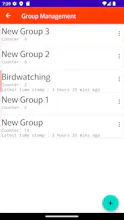
While many apps offer history logs, "Count Artisan 匠" changes the game by displaying your recent activity and timestamps directly on the counting screen in real-time. No need to switch tabs or open menus. You can see exactly when and what you counted at a glance, supporting high-precision tracking for users who need to minimize errors. Built specifically for Android with native, smooth controls—like volume-key counting—it packages all essential tally functions into one powerful tool.




Free
Launch Team / Built With


CloudflareStill paying to deploy your apps? Try Cloudflare Workers for free
Promoted
Hey Product Hunt!
I’m excited to launch Count Artisan today!
Have you ever used a tally counter and suddenly thought:
- "Did I just count that?"
- "Did I double-tap by mistake?"
- "Was my last count 10 seconds ago or just now?"
We’ve all been there. Common counting anxiety ruins high-precision tasks—whether you're managing inventory, tracking research data, keeping score in a match, or logging workout sets.
I built Count Artisan to eliminate this exact doubt. Instead of hiding logs behind menus or forcing you to switch tabs, Count Artisan displays your timestamped activity in real-time right on the counting screen. You get instant visual feedback for every single tap, so you can spot and correct errors the moment they happen.
🌟 The All-in-One Solution
Why clutter your phone with multiple single-purpose apps? Whether you need a simple tally, a 1v1 scoreboard, or a win/loss/draw tracker, Count Artisan handles it all in one intuitive interface.
🚀 Key Features
- Precision Support: Real-time history summary with timestamps displayed directly during active counting.
- Instant Undo: Quickly correct accidental taps with a dedicated undo function.
- Versatile Counter Types: Simple tallies, win/loss records, 1v1 live scores, and win/loss/draw formats.
- Powerfully Customizable: Set custom increments, limits, and auto-reset rules. Add extra custom buttons for frequent jumps (e.g., +5, +10).
- Native Android UX: Tactile volume-key counting, long-press actions, and smooth drag-and-drop reordering.
- Data Portability: Export your history to Text or CSV for professional analysis.
- Advanced Organization: Group management and smart auto-coloring for instant identification.
🎯 Perfect For
- Precision Seekers: Users who need to verify every single increment via the on-screen history summary.
- Multi-Taskers: People who need to track different metrics simultaneously—like counting specific sports techniques while managing the overall match score.
- Data-Driven Users: Those who need timestamps and CSV exports for inventory, scientific observations, or habit tracking.
I’ll be here all day to answer any questions. Thank you so much for your support!
This is one of those apps that I didn't know I needed... Looking forward to the iOS! Congrats on the launch!
@hannahawitan Thank you so much for the kind words and support! Hearing that means a lot to us!
While we are currently focused on delivering the best native experience on Android with our highly optimized UI, we are definitely on the fence about an iOS version as we see more interest!
Thanks again for celebrating our launch!