CopyTrans Backup Extractor

CopyTrans Backup Extractor

extract your iPhone data from iOS backup to PC

1 follower

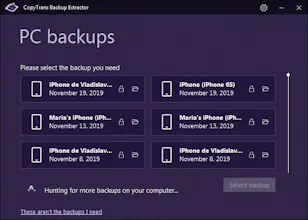
Use CopyTrans Backup Extractor to: - run an automatic backup search on your PC; - export all the data from a backup to your PC.; - get your data out of the backup and onto your PC; - see what is inside the backup without restoring it.
CopyTrans Backup Extractor gallery image
Launch Team

What do you think? …

CopyTrans
Hello everyone, we are CopyTrans Team, makers of CopyTrans Backup Extractor. We are a team devoted to making easier lives of those users who have iPhones and Windows computers. Our applications allow users to make data transfers, backup and restore their data, manage iTunes libraries and much more. This latest product of ours helps people who have lost or broken their iPhones and want to restore their data to PC or who just want to extract a set of iOS data without overwriting the data on their device. When you command it to, CopyTrans Backup Extractor will: - run an automatic backup hunt and make a list of all the backups available on your PC: whether made with iTunes, our software or other 3rd party apps; - allow you to extract all or some types of data to PC; - extract some data from a corrupt backup that cannot be restored. CopyTrans Backup Extractor is chracterized by ease of use and moderate cost.