Convert web pages to LLM-optimized Markdown + YAML format in one click ! No complicated settings are required. Just right-click to convert the entire page. Preview function allows you to see the conversion results instantly.
No reviews yetBe the first to leave a review for Copy as Markdown for AI
Hunter
📌
Markdown conversion tool for the AI era!
Convert web pages to LLM-optimized Markdown + YAML format in one click.
No complicated settings are required. Just right-click to convert the entire page.
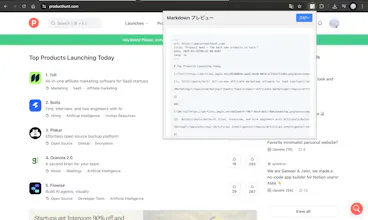
Preview function allows you to see the conversion results instantly.
🍎 Super simple operation
Right-click on the page → “Copy full page text as Markdown”.
Right-click on selected text → “Copy selected text as Markdown
Right-click on an image → “Copy image URL in Markdown format”
Right-click on a link → “Copy link as Markdown”.
🤖 AI-optimized formatting
YAML Front-Matter is automatically added before Markdown body text.
--- ...
url: https://example.com/article
title: “Article title”
date: 2025-04-27T12:34:56Z
lang: en-JP
--- lang: en-japan-en
Report
This tool looks incredibly useful! The ability to convert entire web pages into LLM-optimized Markdown and YAML format with just a right-click is super convenient. I love how it simplifies the process without requiring complex settings - this is a game-changer for anyone who needs to quickly convert content for AI projects or documentation.
The automatic inclusion of YAML front-matter is a nice touch for streamlining the process, and the preview feature is an awesome addition.
Do you have plans to support additional customizations in the future, like being able to modify the YAML metadata or tweak formatting options for specific use cases?
Looking forward to seeing how this evolves - definitely a tool I’ll be keeping on hand!
Report
Hunter
@evgenii_zaitsev1 It is a great idea to be able to modify the YAML metadata and tweak the formatting options for specific use cases! We are still in the early stages of development and plan to make many updates in the future. Please look forward to it 🔥
Love this! Easy concept, easy to use and one problem at a time, this will be a useful tool for AI developers.
Report
Hunter
@justin_bao Since it is now commonplace to refer to the whole or part of a web page as md, hopefully this tool will become the de facto standard. At least I will continue to use it 🚀
Report
Hunter
🎉 Thank you all for your amazing comments! 🙌
🚀 This product is still in its early stages, but we're super excited about what's coming next! Stay tuned as we roll out updates to make it even more convenient and tailored to your needs. ✨
💡 Got ideas or feedback? We're all ears! Your suggestions mean the world to us. 🌎
🙏 Huge thanks for your support! Let's build something awesome together! 🚧😄
Report
LLM-optimized Markdown with instant preview? Now that's how you bridge the web-to-AI content gap!
Report
Hunter
We have released it with support for English notation! Please try it! ❤️



This tool looks incredibly useful! The ability to convert entire web pages into LLM-optimized Markdown and YAML format with just a right-click is super convenient. I love how it simplifies the process without requiring complex settings - this is a game-changer for anyone who needs to quickly convert content for AI projects or documentation.
The automatic inclusion of YAML front-matter is a nice touch for streamlining the process, and the preview feature is an awesome addition.
Do you have plans to support additional customizations in the future, like being able to modify the YAML metadata or tweak formatting options for specific use cases?
Looking forward to seeing how this evolves - definitely a tool I’ll be keeping on hand!
@evgenii_zaitsev1 It is a great idea to be able to modify the YAML metadata and tweak the formatting options for specific use cases! We are still in the early stages of development and plan to make many updates in the future. Please look forward to it 🔥
FiloMail
Love this! Easy concept, easy to use and one problem at a time, this will be a useful tool for AI developers.
@justin_bao Since it is now commonplace to refer to the whole or part of a web page as md, hopefully this tool will become the de facto standard. At least I will continue to use it 🚀
🎉 Thank you all for your amazing comments! 🙌
🚀 This product is still in its early stages, but we're super excited about what's coming next! Stay tuned as we roll out updates to make it even more convenient and tailored to your needs. ✨
💡 Got ideas or feedback? We're all ears! Your suggestions mean the world to us. 🌎
🙏 Huge thanks for your support! Let's build something awesome together! 🚧😄
LLM-optimized Markdown with instant preview? Now that's how you bridge the web-to-AI content gap!
We have released it with support for English notation! Please try it! ❤️
https://chromewebstore.google.com/detail/copy-as-markdown-for-ai/ookpfincecbbcdphphhjobiajhikjbhi?authuser=0&hl=ja
available here ❤️🔥
https://chromewebstore.google.com/detail/copy-as-markdown-for-ai/ookpfincecbbcdphphhjobiajhikjbhi