Control Panel for Twitter

Control Panel for Twitter

Tame your Twitter Web timeline

2 followers

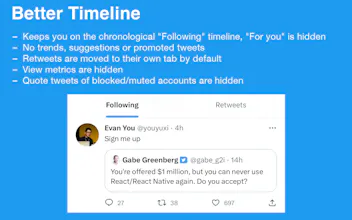
Control Panel for Twitter gives you some of the settings you wish Twitter Web had, and also adds some missing features. Missing your third-party Twitter client on your iPhone? Control Panel for Twitter can give you back some control over your timeline.
Control Panel for Twitter gallery image
Payment Required
Launch Team
Unblocked AI Code Review
High-signal comments based on your team's context
Promoted

What do you think? …

Jonny Buchanan
Hi, I've been making and maintaining a browser extension called Tweak New Twitter for the last 3 and a bit years (currently at 100,000+ users across all browsers). Most people don't know it also fully supports the mobile version of Twitter Web and also has mobile-only features, as it's not currently possible to freely install extensions on the mainline versions of Chrome or Firefox on Android. However, one browser which does support both desktop and mobile extensions is Safari! For this version, I focused on ensuring the options page looks at home on Mac, iPad and iPhone, fixing bugs and polishing support for features in the mobile version, and expanding support for its Twitter Blue check replacement feature to almost all areas of the site (as people seem to really enjoy that one). With the recent shuttering of access to 3rd-party clients, Control Panel for Twitter (the App Store reviewers wouldn't let me use the extension's original name) provides a way for you to use Twitter on your iPhone while still maintaining a semblance of control over your timeline, and not being forced to view algorithmic content like the "For you" timeline, or trends on the Explore page - but you can turn it all back on if you really want to. It also adds missing features like the ability to mute quotes of a specific tweet (remember everyone in your timeline dunking on that GetPercentageRounds code? I only saw about 3 of those), hiding tweets which quote blocked/muted accounts, toggling retweets when viewing Lists, a full-width timeline for media browsing on the desktop version and more... The options are also localized to Japanese and Spanish, with more languages coming soon.