Contextberg
Turn your work into AI agent memory, served over MCP
145 followers
Turn your work into AI agent memory, served over MCP
145 followers
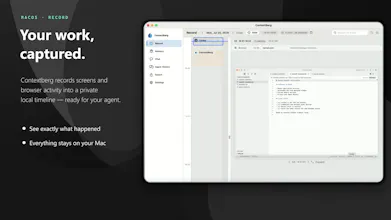
Contextberg is a local memory app for AI agents. It watches your screens, browser history, and agent conversations in the background — so Claude Code, Cursor, and friends can just remember.


Contextberg
Hey Product Hunt 👋
Tired of re-explaining yourself to your own AI agent?
I'm Tiger. Every session reset. Every task switch meant catching my agent up from scratch. My brain was doing the memory work that the agent should be doing.
So I built Contextberg — the missing piece.
🧩 What It Does
A local memory app that runs in the background and feeds context to your agent via MCP.
Watches your screens, browser history, and agent conversation history
Builds both short-term and long-term memory in the background
Supplies context to your agent via MCP using built-in skill commands
No build step. Just install from the Microsoft Store and sign up — that's it. Free to start.
🪟 Built for Windows Developers
Every tool like this was Mac-only. Windows developers were always left out.
Contextberg is Windows-first — and built specifically for Windows, so it runs efficiently without hogging your CPU.
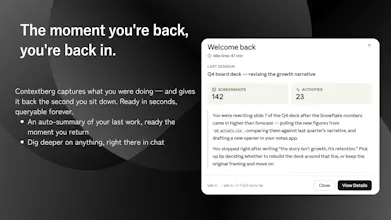
Close your laptop Friday night, mid-debug.
Open it Monday morning. "Where should I start?"
Your agent already knows.
🔭 Long-Term Vision
The end goal: accumulate your personal context into your own data warehouse, and use it as fine-tuning material for a truly personalized LLM. An AI that knows you — not just your last session.
Roadmap:
- macOS & Linux support
- Hermes model integration
- Auto-generation of skill commands
- Skills management view
Got ideas? Drop them in the comments — your feedback shapes what we build next.
🚀 v1.0.0 Is Live Today
What context do you wish your agent just already knew?
The passive capture approach is what makes this architecturally different from most memory tools I've seen... instead of explicitly saving context like most MCP memory layers do, Contextberg just watches and builds it automatically. I've been thinking about this exact tradeoff while working on my own memory system: explicit memory gives you cleaner, more intentional retrieval but passive capture catches the stuff you'd never think to save yourself.
Curious how you're handling the signal-to-noise problem though.. screen and browser history is extremely noisy. Are you doing any relevance filtering before storing, or does everything go in and the retrieval layer handles pruning? Because in my experience with ChromaDB retrieval, garbage-in-garbage-out hits hard when the vector store gets polluted with irrelevant chunks.
Contextberg
@akshaypal_bishnoi Right now, I intentionally store everything.
If you filter before storage, you risk losing exactly the kind of unintended but important context you were talking about. So I treat the raw capture layer as immutable source data.
Then every hour — or every 15 minutes during active periods — Contextberg generates compressed short-term memories from that raw data. That gives me a cleaner first-order memory layer derived from the noisy source instead of relying directly on raw retrieval.
Currently, long-term memories are generated daily from those short-term memories.
But the bigger direction is:
- dynamically generating skills from merged short-term memories
- building a proper RAG layer on top of evolving memory structures
- eventually letting agents form reusable behavioral/context patterns automatically
So instead of pruning early, the idea is:
raw data → compressed episodic memory → structured long-term memory → adaptive skills/RAG.
The memory layer is where most multi-agent workflows actually fall apart. At ~120 engineers I saw juniors lose half their session time re-explaining context the prior session already had. MCP is the right wire-format choice. One thing I'd want to understand before adopting - if Contextberg watches the screen and browser, what's the redaction model when the screen has customer PII or a private repo open? Does memory scope per project, or does the team set explicit exclusions?
Contextberg
Local-first with MCP is an interesting architecture choice, but there's a tension worth exploring: MCP servers are process-local, so when Claude Code or Cursor spins up a new session, it reads from Contextberg's MCP endpoint. Does the memory retrieval happen on every session start, or is it query-driven? And how do you handle the case where two different agents (say, Claude Code and Cursor running simultaneously) are both reading from the same memory store, Do they see the same context snapshot, or does Contextberg maintain per-agent memory streams?
Contextberg
The five-sensor architecture is thoughtfully constructed, and I can see why each signal was included. The keystroke layer in particular raises an interesting design tension that I'd love to understand better.
Screenshots, browser history, app usage, and agent conversations already reconstruct a remarkably complete picture of work context. What specific inference does keystroke data enable that the other four sensors cannot provide? I ask because in my experience building internal activity trackers, the keystroke layer consistently became the most contested component in security reviews, even with exclusion rules in place.
I may be missing a nuance in how the keystroke signal gets processed or weighted against the visual and behavioral signals. Would be curious to hear how the team thinks about the marginal utility of keystroke capture relative to its privacy surface.
Contextberg
Mailwarm
I think memory/context is becoming one of the biggest bottlenecks for AI agents. The model can be smart, but if it forgets the project every session, the user still does the real work.
How do you think guys about privacy and user control with screen/browser history being part of the memory layer?
Contextberg
@thamibenjelloun I fully expect strong criticism and concerns around handling sensitive information, and honestly I want to hear as many opinions as possible.
Because privacy and security matter so much here, one thing I prioritized from v1 was support for local LLMs, so users can keep memory processing entirely on-device if they want.
That said, this doesn’t fully solve the problem for cloud-model users, so features like automatically excluding password inputs or other sensitive moments from capture are already on the roadmap.
Interesting idea, especially the focus on Windows developers since most AI memory tools seem Mac-first. One thing I’m curious about: how are privacy and data controls handled when Contextberg watches screens, browser history, and agent conversations? It would be useful to have very granular controls over what gets stored or excluded.
Contextberg