
Conan
A native Mac cockpit for Claude Code
219 followers
A native Mac cockpit for Claude Code
219 followers
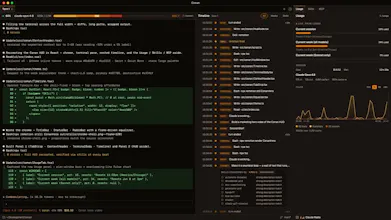
Conan is a native macOS app that wraps Claude Code in a live HUD — every prompt, tool call, skill, and token, surfaced as it happens.
219 followers
219 followers


Hey Product Hunt 👋 I'm Randy.
I use Claude Code all day, and I kept losing track of what it was actually doing. It'd go heads-down for two minutes firing tools and burning context, and the terminal showed me everything except what I cared about. Which tools did it just run? How full is the context window?
I ended up with a usage CLI in one tab, a cost tool in another, and a statusline I had to squint at. I didn't want three side-tools. I wanted one surface to glance at. A cockpit.
So I built Conan, a native macOS app that sits beside Claude Code and turns its live session into a HUD:
- a streaming timeline of every prompt, tool call, and skill as it fires
- a context-window gauge you watch fill
- a usage and cost pulse
It reads Claude Code's local data. No telemetry, nothing about your code or prompts ever leaves the machine.
It's free to use. A one-time $29 unlocks Premium, no subscription, lifetime 1.x updates. macOS-first today; Windows and Linux folks can grab the waitlist.
I'd love your honest feedback, especially from people who live in Claude Code. What would make this a daily driver for you?
Try it → https://www.conan.sh
@randydigital Interesting idea. One thing I’ve noticed with Claude Code is that the more information you expose, the more cognitive load you can accidentally create. At what point does the HUD become another dashboard people monitor instead of something that helps them stay focused?
I’m also curious whether users actually change their behavior after seeing token usage, tool calls, and context consumption in real time, or if it’s mostly reassurance that the agent is doing what they expect. Have you seen any surprising patterns there?
@moh_codokiai Yeah, two real ones for me. The 60% rule, once context passes ~60% I compact/handoff instead of gambling, purely because I can see it climbing live. And confirming my skills actually fire without invocation, the timeline shows fired + considered, so I know whether the one I expected actually kicked in. Both changed how I work.
The context-window gauge is the feature I didn't know I needed. I run long Claude Code sessions and the moment it starts compacting is exactly when things get fuzzy - having that fill level in sight beats finding out the hard way. The three-side-tools-into-one-cockpit framing is the right call too; I was squinting at a statusline for the same info. And keeping it all local (reads Claude Code's own data, nothing leaves the machine) is the detail that makes it actually usable for client work. How live is the timeline - true streaming as tools fire, or polled?
@david_marko Appreciate this — you nailed the three things we obsessed over: the gauge, collapsing the scattered statuslines into one cockpit, and keeping everything on your machine.
On the timeline: it's true streaming, not polled. Claude Code itself tells Conan the moment something happens such as a tool firing, a prompt goes out, or a skill runs, and that row shows up instantly. There's no refresh loop sitting there checking every few seconds; the event pushes straight through. So what you're watching is exactly as live as the session itself.
I live in the Claude Code terminal all day and honestly the bare CLI experience is fine until you're juggling more than one session — then it's just tabs everywhere and losing track of what's running where. A proper native Mac UI for this seems overdue. Does it let you switch between multiple active sessions easily, or is it more of a single-session viewer?
@josedamian Multi-session, not just a viewer. Each session opens in its own tab, and each tab holds onto its working directory, so you always know which project is running where.
The "tabs everywhere, losing track" pain is basically the whole reason it exists. Give it a try under your real workload and tell me if it holds up.
@randydigital That's exactly the use case I needed confirmed. Pulling it down to try with my actual workflow this week — will report back.
@randydigital I understand the problem, but I keep wondering how many developers actually care about the mechanics versus the result.
If Claude spends 20 tool calls and 50k tokens but still produces the correct outcome, does the average developer want to inspect the journey? Or is this aimed more at engineering managers and power users who need visibility into cost and behavior?
Feels like there are potentially two very different customers hiding behind the same product.
@josh_bennett1 Totally fair worry. Where it really earns its keep is build/loop runs, you can actually see the tasks the agent is working through instead of squinting at scrollback wondering what step it's on.
Congrats on putting this together.
The problem is real IMO, especially when managing multiple concurrent agents. But to extend your analogy: if a cockpit has too many flashing lights and live streams, the pilot still gets overwhelmed.
For me, the ultimate HUD wouldn't just stream the raw data—it would summarize it. I’d love a feature inspired by how Gemini handles meetings: if I'm deeply focused on another task for 5 minutes and glance back, give me a quick "catch up" summary of what the agent actually achieved over those 5 minutes.
Distilling the chaos into a quick TL;DR status report.
@rightsum Totally fair, the flashing-lights problem is real. right now Conan leans toward the raw stream (every prompt, tool call, skill, token as it happens) but you're right that past a certain pace you want the distilled version, not the firehose. a "what did the agent actually do in the last 5 min" catch-up summary is a great idea, especially with multiple agents running. putting it on the list. appreciate the thoughtful take.
the interesting fork for a claude code cockpit is where you tap state — parsing the .claude jsonl logs vs wrapping the process for live events. the log route is robust but always a step behind.
@qifengzheng We went hooks-first instead of log-tailing. Claude Code's hook system pushes events to a local gateway live, so we dodge the "step behind" problem. Logs are still useful for history backfill, and we scrape the live TUI frame for the stuff that's neither logged nor hooked (/context, /usage token counts).
@randydigital hooks-first makes sense — the live gateway sidesteps the lag. the TUI-frame scrape for /context + /usage is the fragile seam though: it breaks every time claude code reflows the terminal layout. version-pinning the parser against CC releases is the tax you inherit there.